

How to Format Dash Cam SD Card: The Ultimate 2026 Guide for Reliable Recording
Bleat
Imagine checking your dash cam after a near-miss only to see a "Memory Error" blinking back at you. It's the exact moment your high-tech protection fails right when you need it most. Many drivers face the stress of corrupt files or "Card Error" messages because they treat their storage like a simple USB stick. Learning how to format dash cam SD card correctly is the vital difference between a blank screen and crystal-clear 4K evidence.
We understand the frustration of choosing between FAT32 and exFAT while worrying about data corruption. You deserve a reliable system that works every time you start the engine. This ultimate 2026 guide masters every method to optimize your card for the heavy demands of modern video. We explore why the latest SD Express standards with 4GB/s speeds matter and how to manage high-capacity SDUC cards. You'll learn to maintain your hardware for the long term, ensuring your Bleat 4K car dashcamera remains a trusted companion on every journey.
Key Takeaways
- Understand how loop recording stresses digital storage and why regular resets are essential for 4K protection.
- Master how to format dash cam SD card using native on-device tools to ensure total file system compatibility.
- Identify the critical hardware specifications, including V30 speed classes, required for reliable high-resolution recording.
- Learn when to use computer-based deep cleaning to resolve persistent "Card Error" messages and firmware conflicts.
- Optimize your Bleat dashcamera with routine maintenance steps that guarantee your footage is always saved correctly.
Why You Must Format Your Dash Cam SD Card Regularly
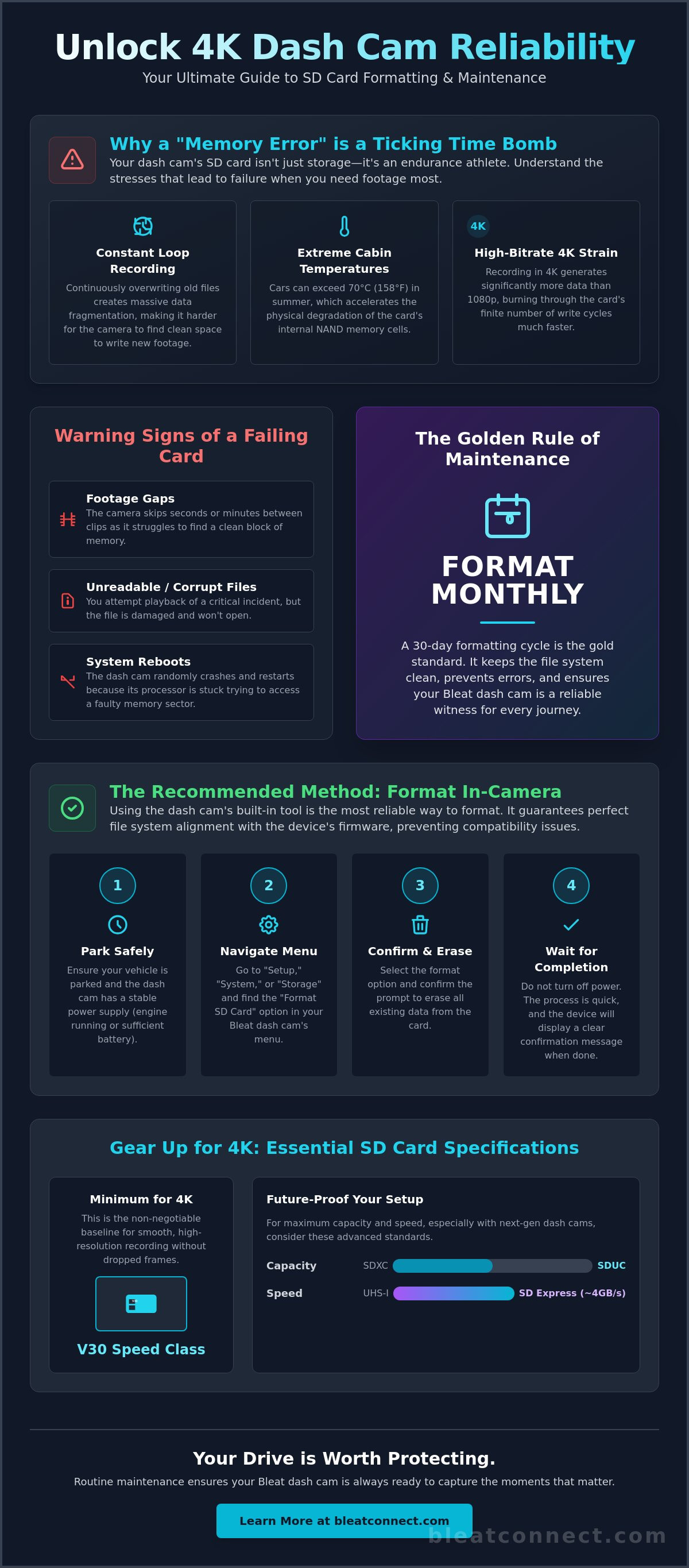
Protecting your vehicle requires more than just mounting a lens; it demands proactive digital maintenance. Formatting is the process of refreshing the SD card format, which resets the file system and wipes away ghost data fragments that accumulate over time. Unlike a standard digital camera that only saves when you press a button, a dash cam is a high-performance endurance machine. It utilizes loop recording, meaning it continuously overwrites old footage with new data the moment the engine starts. This relentless cycle creates massive data fragmentation. If you don't know how to format dash cam SD card properly, you risk your device failing exactly when an accident occurs.
Beyond data management, formatting addresses environmental wear. Most generic guides overlook the impact of extreme temperatures. Your car is essentially a greenhouse. During peak summer, internal cabin temperatures can exceed 70°C (158°F). This intense heat accelerates the physical degradation of the NAND flash memory cells inside your card. Regular formatting helps the internal controller manage these heat-stressed sectors more effectively, preventing the dreaded "Memory Card Error" before you pull out of your driveway.
The Science of SD Card Wear and Tear
Every microSD card has a finite number of "write cycles." Once these are exhausted, the card becomes a "read-only" brick. When you use a high-bitrate Bleat 4k car dashcamera, you are pushing significantly more data than a standard 1080p unit. This increased load burns through write cycles at an accelerated pace. You might notice the camera taking longer to initialize or the card feeling unusually hot when you remove it. These are early warning signs that the hardware is struggling under the load of 4K streams.
Common Symptoms of a Fragmented Card
A neglected card won't always warn you with a beep. Sometimes, it fails silently, leaving you without evidence when you need it most. Watch for these specific red flags:
- Footage Gaps: The camera skips several seconds between clips because it's hunting for a clean block of memory.
- Unreadable Files: You attempt to play back a critical clip, but the player reports a "corrupt file" error.
- System Reboots: The dash cam crashes and restarts because the internal processor is stuck in a loop trying to communicate with a faulty storage sector.
For daily drivers, the 30-day rule is the gold standard. Mastering how to format dash cam SD card once a month keeps your file architecture lean. It ensures your Bleat dashcamera remains a reliable digital witness for every kilometer of your journey.
Method 1: Formatting Directly on Your Dash Cam (Recommended)
Native formatting is the most reliable path to a stable recording environment. While computers are useful for deep cleaning, the dash cam's built-in tool is specifically designed to align the card's file structure with the camera's unique firmware. This eliminates compatibility issues that often arise when a computer introduces foreign system files. Using the device's own processor ensures the "Allocation Unit Size" is perfectly optimized for high-bitrate video streams. When you learn how to format dash cam SD card using the internal menu, you are ensuring the hardware can write 4K data chunks in the most efficient blocks possible.
Before you begin the process, ensure your vehicle is parked. Stable power is critical for this operation. A power surge or a sudden shutdown during the formatting process can corrupt the card's boot sector, potentially rendering the storage media useless. If your camera is hardwired, ensure the engine is running or the battery has sufficient voltage to maintain an uninterrupted connection. Most modern units will automatically stop recording when you enter the menu, but it's a good practice to manually pause the feed first to prevent any write-access conflicts.
To start, navigate to the "Setup," "System," or "Storage" menu on your device. Look for the "Format" option. Once you trigger the command, the status LED will usually flicker rapidly or change color. Do not touch any buttons or toggle the power until the screen displays a clear confirmation message. This process usually takes less than ten seconds but is the single most important step in your monthly maintenance routine.
Using the Bleat Interface for Quick Formatting
The Bleat 4k car dashcamera features an intuitive touch interface designed for rapid navigation. This allows you to maintain your storage without fumbling through complex sub-menus. Follow these specific steps for a clean reset:
- Tap the gear icon on the main screen to enter the settings menu.
- Scroll through the list to find "Format SD Card."
- Select the option and confirm the prompt to erase all existing data.
- Wait for the "Format Successful" notification before exiting to the live view.
Formatting via Mobile App
If your device is tucked behind a rearview mirror or lacks a built-in screen, the smartphone bridge is your best tool. Modern connectivity allows you to manage how to format dash cam SD card without ever removing the unit from its mount. Connect your phone to the dash cam's local Wi-Fi network and open the proprietary management app. Locate the storage settings under the "Advanced" or "Device Settings" tab. Formatting via the app is the smartest way to manage hidden or mirror-mounted units, ensuring your digital witness is always ready for the road ahead.
Method 2: Formatting on Windows or Mac Computers
While in-camera maintenance is the daily standard, your computer is the intensive care unit for storage. Use a PC or Mac for deep resets after firmware updates or when facing persistent "Card Error" messages. This level of control allows you to rebuild the file architecture from scratch. You'll need a high-quality microSD to SD adapter or a dedicated USB 3.0 card reader to ensure stable data transfer. Before you begin, backup any "locked" incident files or emergency clips. Formatting is a total wipe; once you click "Start," that data is gone forever.
The choice between FAT32 and exFAT is critical for 4K stability. For cards 32GB and smaller, the FAT32 system is the universal standard for compatibility. However, for 64GB cards and larger, exFAT is the mandatory choice. This system supports the massive file sizes generated by high-bitrate sensors. When the internal camera menu isn't enough, knowing how to format dash cam SD card on a computer becomes your secondary defense against storage failure. This manual control is the most effective way to manage how to format dash cam SD card for long-term stability.
Windows PC: The 'Right-Click' Quick Method
Windows offers the most granular control over your card's health. Insert your card and locate the drive in File Explorer. Right-click the drive icon and select "Format." Under the "File System" dropdown, select exFAT for any card used in a Bleat 4k car dashcamera. Set the "Allocation Unit Size" to "Default" or 64KB to optimize how the camera writes video blocks. While "Quick Format" is usually sufficient for routine cleaning, uncheck the box for a "Full Format" if you suspect the card has corrupted sectors. This deeper scan takes longer but can revive a struggling card.
macOS: Using Disk Utility Safely
Apple users should rely exclusively on the Disk Utility tool for storage management. Open the application and identify your microSD card under the "External" header. Click the "Erase" button at the top of the window. For high-capacity cards, choose "exFAT" from the format list; for older 32GB cards, select "MS-DOS (FAT)." Ensure the "Scheme" is set to "Master Boot Record" for maximum camera compatibility. After the process finishes, always use the "Eject" command before pulling the card. Skipping this step can cause immediate data corruption, forcing you to start the entire process over again.
Choosing the Right SD Card for 4K Dash Cams
High-resolution 4K sensors produce a relentless torrent of data. If your storage media cannot keep pace, the internal buffer overflows and recording stops. You might already understand how to format dash cam SD card, but if the physical hardware is inferior, formatting is merely a temporary fix for a terminal problem. Automotive environments are uniquely brutal. Dashboards frequently exceed 70°C, a temperature that causes standard consumer-grade cards to delaminate and fail. You need hardware designed for the heat of the road and the friction of constant writing.
Speed classes are the most critical metric for 4K stability. While older "Class 10" cards were sufficient for 1080p, they're obsolete in 2026. Look for the V30 or U3 symbols on the card face. These ratings guarantee a minimum sustained write speed of 30MB/s, which is essential for handling the high bitrates of modern sensors. For those seeking future-proof performance, the latest SD Express standard with PCIe Gen4 x2 interface can deliver speeds up to 4GB/s. This ensures your device never skips a frame during critical high-speed maneuvers.
The Difference Between 'Standard' and 'Endurance' Cards
Standard microSD cards are engineered for smartphones and occasional photo saves. Dash cams require "High Endurance" cards built specifically for 24/7 write-heavy operations. Using a standard card in a high-bitrate environment often voids your manufacturer warranty because the hardware isn't rated for such intense friction. High Endurance is defined as the ability to withstand thousands of overwrite cycles without cell degradation. It is the only way to ensure your 4K footage remains secure over years of daily driving.
Recommended Specs for Bleat 4k Dashcamera
To maximize the reliability of your Bleat 4k car dashcamera, we recommend a minimum capacity of 128GB. Larger cards provide a wider loop recording window, which reduces the frequency of overwrites and extends the total lifespan of the memory cells. Ensure your card meets these specific requirements:
- V30 or U3 Rating: Prevents "buffer underrun" errors during high-bitrate recording.
- A2 Rated: Optimizes app performance for faster footage previews on your phone.
- SDXC or SDUC: Supports the large file sizes required for 4K video files.
Mastering how to format dash cam SD card is only half the battle. Pairing that knowledge with high-endurance, heat-resistant hardware creates an unbreakable chain of protection for your vehicle.
Maintaining Your Bleat Dashcam for 24/7 Protection
Digital maintenance is the heartbeat of a reliable security system. While your storage media handles the data, the physical unit must withstand the brutal environment of your vehicle's dashboard. Extreme temperatures, often peaking above 70°C in direct sunlight, don't just stress the memory cells; they can also affect the optical clarity of your lens and the stability of your mount. A clouded lens or a vibrating bracket can ruin 4K footage just as effectively as a card error. Perform a quick physical inspection every month to ensure your hardware remains a sharp, silent witness.
Software is the bridge between your camera and your storage. Manufacturers release firmware patches to optimize how the processor communicates with the latest SD Express and SDUC card standards. These updates often include improved write algorithms that reduce the physical friction on your card's flash memory. When you understand how to format dash cam SD card, you must also understand that software keeps that process efficient. Always check for the latest 2026 firmware patches to ensure your hardware is running the most stable code available.
Firmware and Software Synergy
Bleat updates are specifically engineered to enhance proprietary hardware integration. These patches refine the "garbage collection" process, which is how the camera identifies and clears unused data blocks. This optimization significantly reduces the risk of system reboots and "buffer underrun" errors during high-speed recording. After installing any update, a fresh format is mandatory. This ensures the new file-writing logic starts with a clean, perfectly aligned architecture. It's the smartest way to keep your 4K stream consistent and error-free.
Securing Your Evidence
The most common fear regarding storage maintenance is the accidental deletion of critical evidence. Modern units utilize a G-Sensor to automatically "lock" footage during a collision, moving the file to a protected folder that loop recording cannot overwrite. However, you should also use the manual emergency button for non-impact incidents like road rage or witnessing an accident. This ensures that when you finally perform the steps for how to format dash cam SD card, you aren't accidentally deleting the very evidence you need. Always verify your locked folder is clear before triggering a total wipe.
Your weekly 60-second health check should include:
- Lens Inspection: Wipe the glass with a clean microfiber cloth to remove heat-induced haze or dust.
- Mount Stability: Ensure the adhesive hasn't softened due to dashboard heat; a firm mount prevents motion blur.
- Status Check: Glance at the screen or LED to confirm the recording icon is active and "Card Full" errors are absent.
- Manual Save: Press the emergency button once to verify the locking mechanism is responsive.
Reliability isn't a one-time setup; it's a habit. Upgrade your road security with the Bleat 4k car dashcamera and stay protected with the most advanced storage management in the industry.
Upgrade Your Digital Defense
Your road safety depends on the absolute reliability of your data. Mastering how to format dash cam SD card ensures your hardware never misses a critical incident due to a preventable storage conflict. By committing to the 30 day maintenance rule and choosing high endurance V30 memory, you eliminate the risk of "Corrupt File" messages. You now have the technical expertise to manage your storage through native device tools or deep computer resets.
Ultimate protection requires more than just correct settings; it requires market leading technology. The Bleat 4K car dashcamera provides 4K Ultra HD Resolution and Advanced G-Sensor Protection to keep your footage secure. It's a system trusted by thousands of drivers nationwide to deliver crystal clear evidence when it matters most. Take control of your vehicle's security today and ensure your digital witness is always prepared for the unexpected.
Secure your journey with the Bleat 4K Dashcamera
Drive with the confidence that your digital witness is always alert and ready. Your next journey deserves the highest standard of protection and innovation.
Frequently Asked Questions
Why does my dash cam keep saying 'Format SD Card'?
This alert typically triggers when the internal file system becomes corrupted or heavily fragmented due to relentless loop recording cycles. Your camera detects that it can no longer safely write new data without risking a total system failure. It's a protective measure designed to ensure you don't lose critical evidence. Regularly learning how to format dash cam SD card prevents these interruptions and keeps the device's write cycles optimized for high bitrate 4K streams.
Can I format my dash cam SD card on my Android phone?
Yes, you can format the card via your phone's storage settings or through the proprietary management app. However, we recommend using the dash cam's native interface whenever possible for maximum stability. Android devices often introduce hidden system folders that can occasionally confuse camera firmware. If you must use your smartphone, ensure you select the correct file system to maintain seamless hardware integration with your Bleat 4K unit.
What is the best file system for a dash cam SD card: FAT32 or exFAT?
The ideal file system depends entirely on your card's storage capacity. For cards 32GB and smaller, FAT32 remains the universal standard for compatibility across older hardware. For modern 64GB to 2TB cards, exFAT is the mandatory choice because it supports the massive file sizes generated by 4K sensors. Using the wrong system can lead to immediate recording failures or persistent "Card Full" errors that stop your protection mid-drive.
Will formatting my SD card delete all my saved videos?
Yes, formatting is a destructive process that wipes every byte of data currently stored on the card. This includes both standard loop recordings and "locked" incident files saved by the G-sensor. Always back up your critical evidence to a computer or cloud storage before you start the process. Once the format begins, the data is unrecoverable, so double check your protected folders before you click the confirm button.
How long does an SD card last in a dash cam before it needs replacing?
High endurance microSD cards typically last between 12 and 24 months in a daily driver environment. The constant overwrite cycles of high resolution recording eventually wear out the physical NAND flash memory cells. If you notice persistent errors even after mastering how to format dash cam SD card, it's a clear signal the hardware has reached its end of life and requires an immediate upgrade to maintain reliability.
Does a 4K dash cam require a special type of SD card?
Absolutely. A 4K dash cam requires a "High Endurance" card with a minimum speed class of U3 or V30. Standard cards designed for phones cannot handle the intense bitrates or the extreme 70°C dashboard temperatures. For peak performance in 2026, we suggest cards supporting the SD Express standard. These offer the 4GB/s speeds needed for advanced edge intelligence and zero-latency recording during high speed travel.
What happens if I don't format my SD card for a long time?
Neglecting your storage leads to the accumulation of corrupted data fragments and file system errors. This results in silent failures, such as gaps in your footage where the camera "skips" several seconds of a drive. Eventually, the card will stop recording entirely or enter a "read-only" state. Regular maintenance ensures the file architecture remains lean, efficient, and ready for the heavy demands of modern video writing.
Can I use a 256GB SD card in my Bleat dash cam?
Yes, the Bleat 4k car dashcamera supports high capacity cards up to 256GB and beyond. Utilizing a larger card is actually a strategic advantage. It increases the time between overwrite cycles, which significantly extends the physical lifespan of the memory cells. Just ensure the card is formatted to exFAT to handle the large storage volume and high resolution video files correctly for 24/7 vehicle protection.