

Dash Cam Memory Card Size Guide: Choosing the Right Storage for 4K Recording
Bleat
Your 256GB memory card is a ticking time bomb if it isn't rated for high endurance. You've likely asked: what size SD card do I actually need for a 4K dashcam to prevent crashes? This dash cam memory card size guide cuts through the technical jargon to ensure your Bleat 4k car dashcamera never misses a frame. We know the frustration of seeing a "Card Error" message during a critical moment. Standard cards often buckle under intense heat or fail to sustain the U3 and V30 speeds required for 2026 4K video standards.
You deserve total confidence in your vehicle's security. This guide promises to simplify your storage strategy so every second of your drive remains protected. We provide a clear breakdown of recording hours per gigabyte and explain why high-endurance hardware is the only reliable choice for insurance claims. Learn to identify the right specifications for Indian road conditions and ensure your footage is ready when it matters most. Secure your evidence. Drive with certainty.
Key Takeaways
- Identify why V30 and U3 speed classes are mandatory for high-bitrate 4K capture to avoid critical data loss.
- Use this dash cam memory card size guide to calculate exact recording times and choose the ideal capacity for your driving habits.
- Protect your evidence by selecting high-endurance cards designed to withstand extreme thermal stress and constant write-erase cycles.
- Avoid system failures with a proactive maintenance schedule that keeps your storage optimized and your hardware running smoothly.
- Maximize the performance of your Bleat 4k car dashcamera through seamless integration with high-bitrate storage solutions.
Why Dash Cam Memory Card Size and Type Matter in 2026
Your dashcam is the most hardworking piece of tech in your vehicle. While your smartphone saves a photo once and leaves it alone, a dashcam operates in a state of perpetual motion. It performs constant "write-erase" cycles; it hammers the flash memory cells every single second you drive. In 2026, high-resolution 4K footage demands massive data throughput and unrelenting sustained speeds. Most generic microSD cards are simply not engineered for this level of stress. Using a standard card often voids your warranty because manufacturers know these consumer-grade chips will fail under automotive pressure. Understanding SD card speed classes and formats is the first step in building a reliable mobile surveillance system. You need a card that keeps up with the rapid-fire data delivery of a premium sensor.
The Mechanics of Loop Recording
Dashcams like the Bleat 4k car dashcamera segment video into manageable 1, 3, or 5-minute clips. This structure ensures that a single corrupted file doesn't ruin an entire day of recording. However, this management style creates intense card fatigue. As the storage reaches capacity, the dashcam processor must simultaneously delete the oldest files while writing new, high-bitrate data. In the sweltering environment of a parked car where temperatures can exceed 70°C, this thermal stress accelerates hardware degradation. If your card isn't high-endurance, the overwrite process can lead to catastrophic frame drops. You might find your most needed footage is nothing but a digital blur when you go to file a claim.
4K UHD vs. 1080p Storage Demands
The jump from 1080p to 4K isn't just about visual clarity; it's about a massive increase in data volume. A 32GB card might have served you well in the past, but it's now entirely insufficient for 4K setups. It provides barely an hour of footage before it begins the loop. This dash cam memory card size guide emphasizes that modern dual-channel systems, recording both front and rear views, double the storage burden instantly. You need enough buffer space to ensure that "locked" event files, triggered by the G-sensor, don't consume your entire loop capacity. Relying on an undersized card means your evidence could be overwritten before you even get home. High-capacity, high-speed storage is the only way to safeguard your journey. Upgrade your storage to match your hardware's potential.
Decoding the Specs: Speed Classes and Endurance Ratings
Don't let a cheap card compromise your safety. While storage capacity is vital, the technical specifications on the label dictate whether your footage actually saves during a collision. For a high-performance device like the Bleat 4k car dashcamera, you need more than just space. You need a card that can ingest data as fast as the sensor generates it. High-bitrate recording creates a relentless stream of information that lower-tier cards simply cannot process. If the card isn't up to the task, your dashcam will likely crash or stop recording without warning.
Speed Classes for 2026 Dashcams
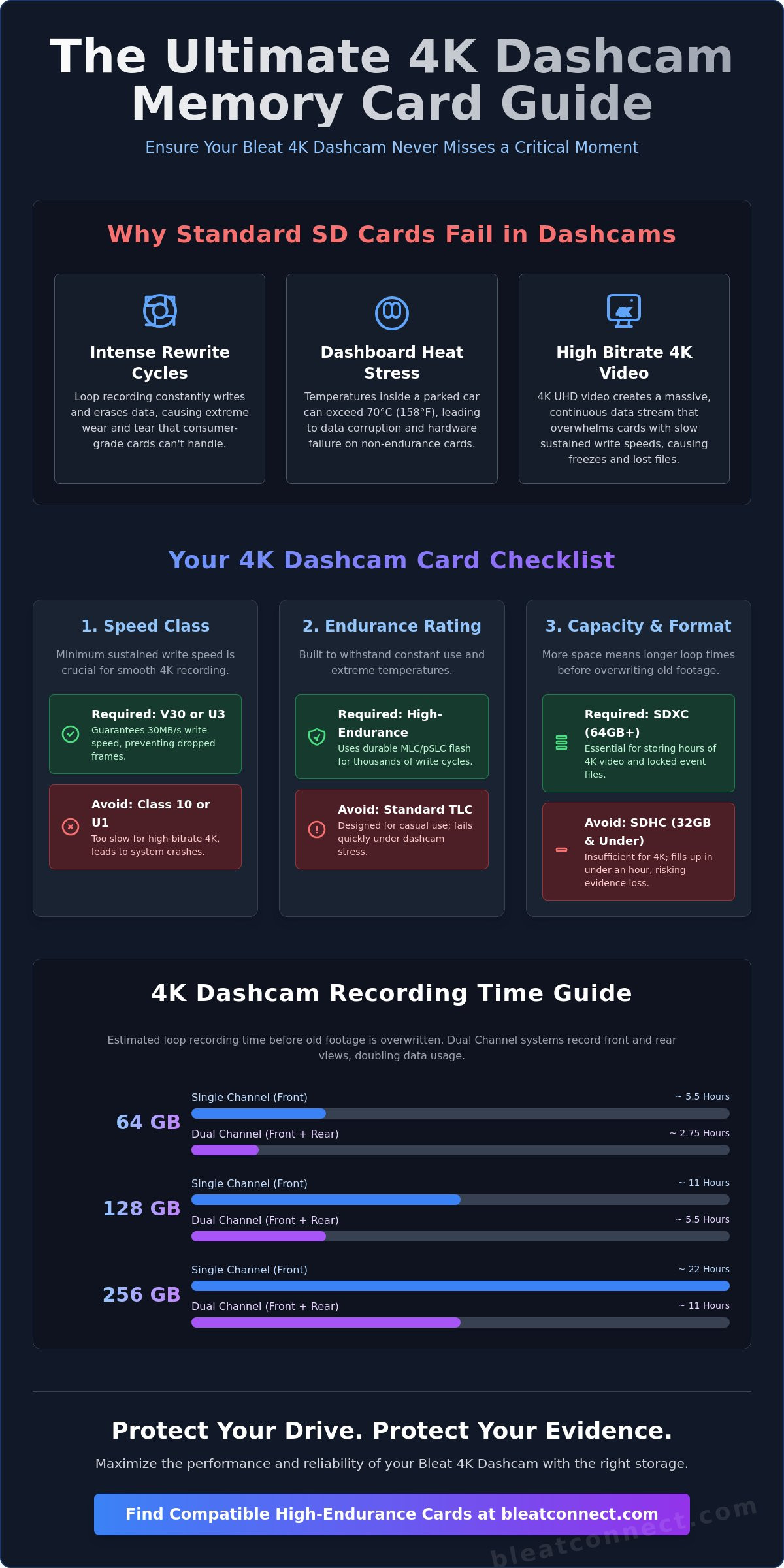
The SD Association Speed Class standards define the minimum sustained write speed of a card. For 4K recording in 2026, U3 (UHS Speed Class 3) or V30 (Video Speed Class 30) is the non-negotiable floor. These ratings guarantee a minimum write speed of 30MB/s. If you use a slower Class 10 or U1 card, the dashcam's buffer will overflow. This results in "dropped frames" or a complete system freeze exactly when you need evidence. Look for the "U" with a "3" inside or a "V30" symbol on the card's face to ensure your hardware maintains peak performance.
High Endurance: The Secret to Longevity
Standard microSD cards use TLC (Triple-Level Cell) flash memory, which is fine for smartphones but fails quickly under constant loop recording. High-endurance cards utilize MLC (Multi-Level Cell) or pSLC (pseudo Single-Level Cell) technology. These are engineered for thousands of write cycles. They are rated for Terabytes Written (TBW), representing the total data the card can handle before it wears out. Choosing a durable card is a strategic investment. One high-endurance unit often outlasts three cheap alternatives while surviving the extreme -25°C to 85°C temperatures common in parked vehicles.
Understanding capacity standards is equally crucial for your setup. Most modern 4K units require SDXC (64GB to 2TB) rather than the older SDHC format, which maxes out at 32GB. While write speed captures the moment, read speed determines how quickly you can review footage on your smartphone or PC. High read speeds ensure a lag-free playback experience when showing evidence to authorities or insurers. This dash cam memory card size guide focuses on these technical pillars to build a fail-safe recording environment. Ensure your premium dashcam setup is backed by storage that never blinks. Reliable storage is the backbone of your digital defense.
Dash Cam Memory Card Size Guide: Recording Times Decoded
Capacity is the foundation of your digital defense. While speed classes ensure the data is written correctly, capacity determines how long that data stays available before the loop recording overwrites it. Choosing an undersized card is a strategic error. In the 4K era, your storage needs have quadrupled compared to old 1080p systems. This dash cam memory card size guide provides the concrete data you need to match your storage to your driving lifestyle. Don't let a critical incident be erased simply because you ran out of digital real estate. High-resolution sensors like those in the Bleat 4k car dashcamera capture immense detail, but that detail requires significant overhead.
4K Recording Duration Estimates
Recording times vary based on bitrate and compression standards. Most modern 4K systems utilize H.265 (HEVC) compression. This technology is highly efficient; it shrinks file sizes by roughly 50% without sacrificing the clarity needed for license plate recognition. However, even with H.265, 4K files remain massive. If you run a dual-channel setup, your storage requirement doubles instantly as the camera saves two separate video streams. Use the estimates below to plan your setup.
| Card Capacity | 4K Single Channel | 4K Dual Channel (Front + Rear) |
|---|---|---|
| 32GB | ~45 minutes | ~22 minutes |
| 64GB | ~90 minutes | ~45 minutes |
| 128GB | ~3 hours | ~1.5 hours |
| 256GB | ~6 hours | ~3 hours |
Choosing Based on Your Driving Habits
Your driving patterns dictate your hardware requirements. A daily commuter spending 60 minutes on the road might find a 64GB or 128GB card sufficient. These capacities provide enough "buffer" time to ensure a morning incident isn't overwritten by the evening drive home. For professional drivers or those embarking on long-distance journeys, 256GB is the minimum standard. It ensures a full day of driving is captured and preserved.
Parking mode users face unique challenges. When your vehicle is stationary, the dashcam continues to monitor for motion or impact events. These "locked" files are protected from the standard loop recording cycle. A larger card prevents these emergency clips from consuming your entire storage pool. If you use the parking surveillance features on your Bleat 4k car dashcamera, prioritize 256GB or higher. This ensures your regular driving loops aren't cut short by archived security clips. Storage is a one-time investment in long-term security. Choose the capacity that covers your longest journey, not just your shortest commute.
Protecting Your Data: Heat Resistance and Maintenance
High-performance storage is useless if it melts under pressure. This dash cam memory card size guide isn't just about gigabytes; it's about survival. Automotive environments are brutal. While a smartphone sits in your pocket, your dashcam lives behind a windshield in direct sunlight. This section explores how to shield your data from environmental hazards and technical decay. Proper maintenance is the difference between having evidence and having a corrupted file during an insurance claim. You've invested in quality hardware; don't let a lack of maintenance compromise your security.
Surviving the Indian Summer
Indian road conditions present a unique challenge: extreme thermal stress. Cabin temperatures frequently soar above 70°C during the peak of summer. Standard microSD cards use consumer-grade controllers that lose data retention capabilities when exposed to this level of heat. High-endurance cards are mandatory. They feature specialized controllers designed to manage the physical expansion and electrical leakage caused by extreme temperatures. Cheap cards often trigger "write-protect" mode or simply fail to save files when the sun is at its peak. To protect your hardware, always park in the shade or use a high-quality sunshade. This simple step reduces the thermal load on your Bleat 4k car dashcamera and its storage medium. Protection starts with the environment you provide for your tech.
The 30-Day Formatting Rule
Digital clutter is a silent killer of memory cards. Over time, constant loop recording can create file system fragmentation or minor metadata errors. We recommend a strict 30-day formatting schedule to keep the storage healthy and responsive. Regular formatting clears out the "junk" data that accumulates during the write-erase cycle.
- Access your dashcam menu system directly on the device.
- Locate the 'Format SD Card' or 'Storage Settings' option.
- Confirm the action to wipe the card clean and refresh the file structure.
Occasionally, a deep clean on a PC using dedicated SD formatting software is necessary to reset the file allocation table. Watch for warning signs of hardware failure. If you notice slow file loading in the app, frequent "Memory Card Error" prompts, or missing clips from your timeline, your card is likely reaching its end-of-life. Most high-endurance cards are rated for specific write cycles. Once exhausted, they often become read-only to protect existing data from further corruption.
Don't overlook physical care. Protect your cards from moisture and static electricity during transfers to your computer. Additionally, keep your device firmware updated. Manufacturers often release patches that optimize how cameras communicate with high-capacity SDXC cards. This ensures maximum stability during high-bitrate 4K capture. Ensure your vehicle is equipped with the best in protective technology. Explore the Bleat 4k car dashcamera range to find hardware built for the toughest environments. Reliability is a choice. Make the right one for your safety.
Optimizing Your Bleat 4K Dashcam with the Right Storage
The Bleat 4k car dashcamera is a high-precision data logger designed for the modern road. It captures UHD 4K video at bitrates that overwhelm standard consumer cards. We've optimized our proprietary firmware to work specifically with high-bitrate V30 and U3 memory cards. This ensures that when the sensor detects a critical event, the data is written to the flash memory without a single dropped frame. Following this dash cam memory card size guide ensures your hardware and storage work in perfect harmony. You wouldn't put low-grade fuel in a performance engine; don't put low-grade storage in your premium dashcam.
Engineered for Performance
Bleat 4K hardware utilizes advanced image sensors that demand a constant, high-speed write stream. We utilize proprietary hardware integration methods to maintain stable loop recording even during high-heat operation. This is why Bleat recommends specific high-endurance brands for its 4K lineup. Our internal testing shows that these cards handle the intense data throughput of our 4K sensors with exceptional reliability. If you ever face confusion over technical specs, Bleat Tech Support offers expert guidance to verify card compatibility for your specific model. We provide the technical clarity you need to make an informed decision for your safety.
Reliability for insurance is our core priority. A dashcam is only as good as the footage it preserves during a crisis. If a card fails at the moment of impact, your digital defense vanishes. Bleat hardware manages file locking for G-sensor events with surgical precision. It instantly isolates incident footage in a protected folder, ensuring it remains safe from the standard loop recording cycle. This gives you the high-resolution evidence needed to resolve claims quickly and confidently. You deserve a protector that never blinks. Our leadership in the market is built on this foundation of uncompromising security.
Your Road Companion
Experience the peace of mind that comes with a "set and forget" storage setup. You shouldn't have to manage your storage manually every day. Our intelligent ecosystem allows you to check your card status, estimated remaining life, and storage health directly through the Bleat smartphone app. This real-time connectivity keeps you informed about your digital well-being at a glance. As a brand committed to innovation, we ensure our products act as essential upgrades for a safer, more connected lifestyle. Your dashcam is a forward-thinking companion for the modern traveler. It provides security and the excitement of owning advanced technology in one polished package.
Secure your journey with the Bleat 4K Dashcam and premium storage today.
Secure Your Digital Defense Today
Your digital evidence depends on the hardware you choose today. A high-resolution drive requires more than just a generic card; it demands sustained V30 speeds and the thermal resilience of high-endurance memory. By following this dash cam memory card size guide, you've prioritized longevity and reliability over cheap, temporary solutions. You've learned that 128GB is the strategic sweet spot for 4K dual-channel recording and that regular formatting is the key to preventing system failures.
Don't let your security be an afterthought. Equip your vehicle with a system designed to survive the harshest road conditions. Our 4K Ultra HD Resolution sensors capture every detail while our High-Temperature Resistant Hardware ensures the device remains operational during sweltering summers. With Seamless Smartphone App Integration, reviewing your footage is instantaneous and effortless. Efficiency and protection are now at your fingertips.
Upgrade to the Bleat 4K Dashcam for Ultimate Road Protection
Your safety is a lifestyle choice. Drive with the confidence of a market leader and protect what matters most on every journey. The road is waiting, and your evidence is secure.
Frequently Asked Questions
Can I use a regular microSD card in my 4K dashcam?
You shouldn't use a standard microSD card because it lacks the endurance required for continuous loop recording. Consumer-grade cards are built for occasional saves, not the relentless data stream of a 4K sensor. High-endurance cards use superior flash memory that survives thousands of write cycles and extreme cabin heat without failing.
What is the maximum SD card size supported by Bleat dashcams?
The Bleat 4k car dashcamera supports high-endurance microSDXC cards with capacities up to 256GB. This dash cam memory card size guide recommends using the maximum supported capacity to reduce the frequency of overwrites. Always check your specific model's manual to ensure compatibility with the latest high-capacity storage standards.
How often should I format my dashcam memory card?
We recommend formatting your memory card at least once every 30 days to maintain peak performance. This process clears fragmentation and refreshes the file allocation table. It's a proactive step that prevents system crashes and ensures your hardware is always ready to capture critical evidence during an incident.
Why does my dashcam say "Memory Card Error" even though it is new?
A "Memory Card Error" on a new card usually indicates that the write speed is too slow for 4K bitrates. If your card isn't rated V30 or U3, the dashcam's buffer will overflow and trigger an alert. Ensure the card is formatted within the dashcam menu rather than on a computer to establish the correct file structure.
How many hours of 4K video can 128GB hold?
A 128GB card typically stores approximately 3 hours of 4K footage at high bitrates. If you're using a dual-channel setup with front and rear cameras, this capacity provides roughly 1.5 hours of storage. This dash cam memory card size guide emphasizes that H.265 compression helps maximize this space without compromising visual clarity.
Does a larger SD card improve the video quality of my dashcam?
A larger memory card doesn't improve the visual quality or resolution of your video. Video quality is determined by the camera's image sensor and processing bitrate. A higher-capacity card simply allows you to store more hours of footage before the loop recording begins to overwrite the oldest files.
Is it better to have one large card or two smaller ones for backup?
It's better to invest in one large, high-endurance card rather than swapping between smaller ones. Larger cards have more physical memory cells, meaning each cell is written to less frequently over time. This significantly extends the total lifespan of the card compared to using two smaller cards that fill up twice as fast.
What happens to the footage when the SD card is full?
Your dashcam automatically performs loop recording, which means the newest footage replaces the oldest files once the card is full. Locked files triggered by the G-sensor or manual emergency buttons are moved to a protected folder. These specific clips aren't overwritten, ensuring your most important evidence remains safe for insurance claims.