

Understanding Dash Cam Loop Recording: The Ultimate Guide for Continuous Protection (2026)
Bleat
What if the most critical evidence of a collision was erased simply because your memory card ran out of space? It's a valid fear for drivers on Indian roads where every second of footage is a potential lifesaver. You've likely invested in a Bleat 4k car dashcamera for peace of mind, yet the confusion over 1, 3, or 5-minute clip settings often creates more anxiety than security. You deserve to know that your device is a reliable protector, not a source of storage frustration.
Mastering and understanding dash cam loop recording is the essential step to ensure your camera never stops documenting the road ahead. This feature acts like a digital conveyor belt, allowing for continuous recording while a smart G-sensor serves as a gatekeeper for your most vital files. We'll show you exactly how to optimize your settings for maximum 4K clarity and how to prevent important evidence from being overwritten. You'll gain total confidence that your high-tech companion is always recording, providing the ultimate safety upgrade for your modern lifestyle.
Key Takeaways
- Master the automated storage process that replaces old footage with new, eliminating the need for manual card formatting on long journeys.
- Gain clarity on the 1, 3, or 5-minute interval settings for better understanding dash cam loop recording and efficient file management.
- Learn how to configure your G-sensor as an intelligent gatekeeper to lock and protect critical collision evidence from being overwritten.
- Optimize your device for Indian roads by adjusting sensitivity for potholes and selecting U3-rated high-endurance SD cards for 4K stability.
- Discover how Bleat 4K technology utilizes high-speed buffer memory and advanced heat dissipation to ensure zero frame drops in intense weather.
What is Dash Cam Loop Recording and Why is it Mandatory?
Imagine driving on a long journey and having your camera stop recording just as a reckless driver swerves into your lane. Without loop recording, this is a daily risk for any driver. At its core, loop recording is an automated storage management system that ensures your device never stops documenting. It works by replacing the oldest unprotected footage with the newest video data in a continuous cycle. This eliminates the tedious need to manually format memory cards or delete files mid-trip. For anyone focused on understanding dash cam loop recording, it's the essential foundation for 24/7 vehicle surveillance and robust insurance protection on unpredictable roads everywhere.
The Digital Conveyor Belt: How It Works
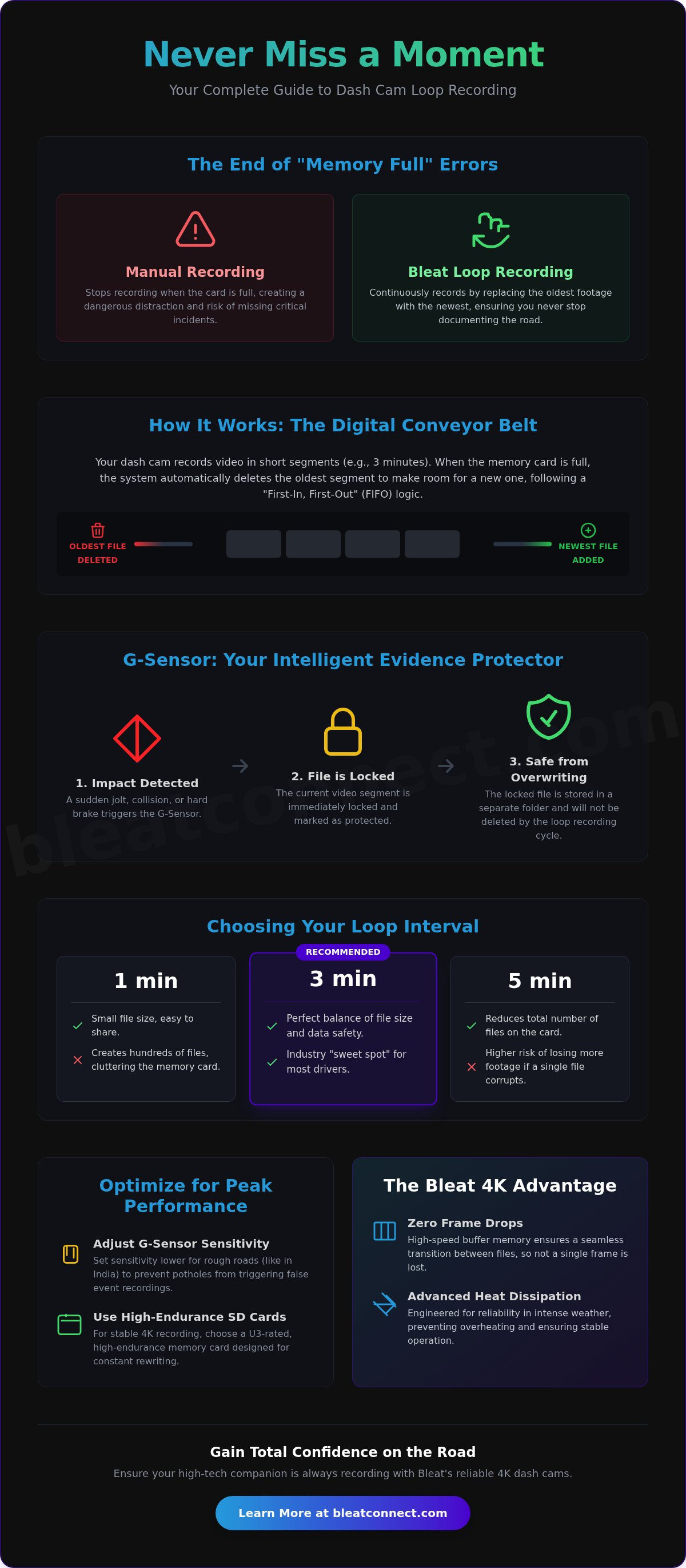
Think of your storage as a digital conveyor belt. The system follows a "First-In, First-Out" (FIFO) logic. Instead of creating one massive, unmanageable file that is prone to corruption, the camera divides video into small, manageable segments. These are typically 1, 3, or 5 minutes long. This architecture allows the internal processor to manage simultaneous recording and deletion without any lag or system crashes. A high-quality Dashcam uses this method to ensure that even if the card reaches its limit, the most recent evidence is always preserved. It's a sophisticated dance between hardware and software designed to keep you protected without requiring your intervention.
Why Manual Recording Fails for Drivers
Traditional digital cameras wait for you to press delete when the "Memory Card Full" error appears. In the context of heavy urban traffic, "storage anxiety" is a dangerous distraction you can't afford. You shouldn't be checking your screen while navigating peak-hour congestion. Loop recording acts as your silent, tech-savvy protector. It removes the human error factor entirely. While a standard camera might fail you the moment its capacity is reached, a Bleat 4k car dashcamera remains vigilant. It's a smarter way to manage your digital well-being on every commute by ensuring the camera never stops recording due to a full disk.
The reliability of this system is what makes it mandatory for modern security. Whether you're using a Bleat 3k car dashcamera or the flagship 4K model, the looping mechanism prevents frame drops during those critical file transitions. In the event of a dispute, having a continuous, unbroken record is the difference between a successful insurance claim and a total loss. By understanding dash cam loop recording, you realize it isn't just a technical setting; it's the heartbeat of your vehicle's safety ecosystem. It ensures that your investment in high-tech protection actually works exactly when you need it most.
The Mechanics of Continuous Recording: Segments and Overwriting
Operating a dashcam effectively requires a deeper dive into the gears behind the glass. While the previous section established loop recording as a digital conveyor belt, the efficiency of this system depends on your chosen clip intervals. Most modern devices offer settings for 1, 3, or 5-minute segments. These aren't just arbitrary numbers. They determine how your processor handles data throughput and file management. For those committed to understanding dash cam loop recording, these intervals are the key to balancing file accessibility with system stability. Higher resolutions, like those found in a Bleat 4k car dashcamera, demand more frequent writes, making the choice of segment length even more critical.
Choosing Your Loop Interval: 1, 3, or 5 Minutes?
Short 1-minute clips are excellent for rapid sharing via mobile apps. They result in smaller file sizes that are easy to transfer, but they create a cluttered memory card with hundreds of files. Conversely, 5-minute clips reduce the total file count but increase the risk of data loss. If a single 5-minute file corrupts due to a sudden power failure, you lose a significant chunk of your journey. Most national drivers find that 3-minute loops are the industry "sweet spot." This setting provides a perfect balance between manageable file sizes and data safety, ensuring your evidence remains organized and intact during long commutes.
A common concern for many drivers is the "gap" between clips. Cheaper hardware often misses a fraction of a second when closing one file and opening the next. Premium devices utilize high-speed buffer memory to maintain a seamless transition. This ensures that not a single frame is dropped during the handoff. This level of precision is similar to the data integrity found in a professional Event Data Recorder (EDR), which serves as a vital tool for crash analysis. When you record in 4K, the bitrates are significantly higher, meaning your card hits capacity faster and the overwriting process occurs more frequently. If you want the highest level of detail for your insurance claims, consider upgrading to a Bleat 4k car dashcamera for reliable, gapless performance.
The FIFO Principle (First-In, First-Out) Explained
The overwriting process follows a strict logical sequence to keep your camera running indefinitely. It isn't random; it is a calculated execution by the onboard processor. Understanding this workflow helps you trust your device during critical moments.
- Step 1: The camera segments your journey into the specific time interval you selected in the settings menu.
- Step 2: The internal processor monitors the remaining SD card capacity in real-time, accounting for the high bitrate of 4K footage.
- Step 3: When the card reaches 100% capacity, the system identifies the oldest unlocked segment for purging.
- Step 4: The processor deletes that oldest file and immediately writes new data into the vacated space, maintaining a continuous loop.
This cycle repeats as long as the camera has power. It ensures that your most recent driving minutes are always available for review, regardless of how many hours you've been on the road. By mastering these mechanics, you transition from a casual user to a tech-savvy protector of your own vehicle.
Preventing Data Loss: How G-Sensors Protect Critical Footage
The looping system is efficient, but it's essentially blind. It treats a scenic sunset drive and a high-impact collision exactly the same. This is where the G-sensor enters the frame. Acting as an intelligent gatekeeper, the G-sensor (or Gravity Sensor) is the hardware bridge between simple video capture and active evidence protection. It continuously monitors your vehicle's movement across three distinct axes. By understanding how accelerometers work, you can see how the device distinguishes between a smooth highway cruise and the violent force of an accident. When a specific force threshold is crossed, the sensor triggers an emergency lock, ensuring that the current segment is never purged by the standard overwriting cycle.
Collision Detection and Automatic File Locking
The science of XYZ axes allows the sensor to detect sudden impacts, hard braking, or sharp turns with precision. It's sophisticated enough to ignore minor vibrations while reacting instantly to a genuine crisis. During a "Lock" event, the processor immediately moves the active video segment to a protected partition on the SD card. This prevents the file from being overwritten, even if you continue driving for several more hours after the incident. Locked files remain on the card until manually deleted by the user. This ensures that your evidence is ready for insurance adjusters or legal authorities when you finally download the footage.
The "Locked Folder" Storage Logic
Digital storage isn't infinite. To maintain system health, dashcams typically partition SD card space into "Normal" and "Event" zones. While the normal loop continues endlessly, the event folder serves as a secure vault for your most critical data. You should be aware that even these locked folders have a capacity limit, usually capped at 30% of the total card space. If you drive on rough roads or have your sensitivity set too high, "false" events like hitting a deep pothole can fill this vault quickly. Periodically checking your locked folder to clear out non-critical files is a vital part of understanding dash cam loop recording and maintaining your device's readiness.
Sometimes the danger doesn't involve a physical impact. Road rage incidents or witnessing an accident ahead of you require manual intervention to save the data. Every Bleat 4k car dashcamera features a dedicated emergency button for these moments. Pressing this button manually triggers the same locking mechanism as the G-sensor. It's a proactive way to secure footage that the automated system might otherwise miss. This dual-layer protection-automated sensing and manual control-transforms your dashcam from a simple recorder into a comprehensive security asset for every journey across India.
Optimizing Settings for National Road Conditions
Indian roads present a unique set of challenges that can compromise your vehicle's security if your settings aren't calibrated correctly. From unscientific speed breakers in Bengaluru to the extreme summer heat of Rajasthan, your hardware faces constant stress. Understanding dash cam loop recording requires more than just turning the feature on. You must optimize the interaction between your G-sensor and your storage media to ensure the system remains reliable. If your settings are too aggressive, your card will fill with useless "protected" files. If they are too relaxed, you risk losing evidence. Finding the perfect balance is what separates a casual user from a tech-savvy protector.
High-Endurance Storage: The Only Choice for Looping
Standard SD cards are designed for occasional use in cameras or phones. They aren't built for the relentless "write, erase, repeat" cycle of a Bleat 4k car dashcamera. Every memory card has a finite number of "write cycles" before the flash memory cells degrade and fail. High-endurance cards (rated U3 or V30) are specifically engineered with superior NAND flash to survive thousands of hours of constant 4K cycling. Using a standard card often leads to system crashes or "Card Error" messages within months. For maximum stability and to prevent frame drops, we recommend using a minimum 128GB U3-rated high-endurance card. This ensures your loop recording has the bandwidth and durability to handle high-bitrate video in any climate.
Fine-Tuning Sensitivity to Avoid "Card Full" Errors
The most common troubleshooting issue drivers face is the "Storage Full" error. This usually happens despite loop recording being active. The culprit is almost always a G-sensor set to "High" sensitivity. On bumpy national highways or roads filled with potholes, every jolt triggers a "false positive" event. The camera locks these files, moving them to the protected partition we discussed in the previous section. Eventually, these locked files consume the entire card, leaving no room for the loop to continue. To prevent this, set your G-sensor sensitivity to "Low" or "Medium." This allows the camera to ignore routine road noise while remaining alert for genuine impacts.
Extreme temperatures also play a role in hardware reliability. Intense heat can cause some processors to throttle data speeds, potentially leading to corrupted loop segments. To maintain peak performance, perform a manual format of your SD card once every 30 days. This "clean slate" approach clears out accumulated file fragments and any "false" locked events that have piled up. It's a simple maintenance step that ensures your device is always ready for the unexpected. If you're ready to upgrade your vehicle's intelligence with market-leading hardware, explore the Bleat 4k car dashcamera range today for professional-grade protection.
Bleat 4K Loop Technology: Engineered for Reliability
While understanding dash cam loop recording is vital, the hardware executing that process determines your true level of security. The Bleat 4K Pro is engineered to handle the intense data demands of modern surveillance without breaking a sweat. It utilizes high-speed buffer memory to act as a temporary staging area for video data. This ensures that during the transition between files, there are zero frame drops. You get a seamless, unbroken narrative of your journey. In the high-stakes environment of Indian traffic, those missing milliseconds are often where the most important details live.
Reliability also means surviving the climate. Intense weather in regions like Delhi or Chennai can cause lesser devices to throttle their processing power, leading to corrupted loops. Bleat hardware features advanced heat dissipation systems designed to maintain peak performance even when your dashboard is under direct sunlight. Additionally, our proprietary file system management is a game-changer for longevity. It optimizes how data is written to the NAND flash, effectively reducing SD card wear by 25%. This means your high-endurance cards last longer, saving you money while maintaining a high-tech safety net for your vehicle.
High-Bitrate Management in Bleat 4K Dashcams
Capturing 4K resolution at 3840 x 2160 pixels generates a massive stream of data. Managing this flow during the overwriting process requires significant processing muscle. Bleat dashcams are built to handle these high bitrates effortlessly. We integrate the industry-leading Sony Starvis sensor to ensure that even as the camera loops through hours of footage, the clarity remains razor-sharp. This sensor excels in low-light conditions, providing the essential detail needed for night-time commutes. For the modern Indian traveler, this hardware is an essential companion that turns every drive into a documented, secure experience.
The Bleat Advantage: Security and Longevity
Bleat has claimed market leadership by focusing on what actually matters: reliable automotive accessories that don't fail when you need them most. Our ecosystem is built for high-stress environments. Through the Bleat App, you gain instant connectivity to your device. You can view, download, or share locked event clips directly to your smartphone without ever removing the SD card. It’s a seamless integration of hardware and software designed for your digital well-being. If you have questions about storage or optimal settings, our direct-to-consumer support is ready to provide expert guidance. Understanding dash cam loop recording is the first step, but owning the right hardware is the final one.
Your journey deserves the best protection available. Don't settle for basic when you can have professional-grade security. Upgrade your vehicle security with the Bleat 4K Dashcamera today and experience the peace of mind that comes with owning advanced, market-dominant technology.
Secure Every Kilometer with Professional Grade Intelligence
Your vehicle is now a fully connected, intelligent asset. By mastering your loop intervals and calibrating G-sensor sensitivity, you have transformed a simple device into a vigilant protector. Understanding dash cam loop recording is the definitive step toward ensuring that every second of your commute is documented with absolute precision. You no longer need to worry about storage errors or manual file management. Instead, you can focus on the drive while Bleat manages your digital evidence.
Our hardware is engineered specifically for the high-stress environments of Indian roads. With 4K Ultra HD Resolution and advanced G-sensor file protection, we deliver the clarity required for insurance claims and legal peace of mind. This is an essential upgrade for any modern traveler seeking market-leading reliability and tech-forward security. It is a seamless blend of protection and enhancement for your connected lifestyle.
Protect your journey with the Bleat 4K Dashcam, Order Now
Join the community of forward-thinking drivers who prioritize their safety through advanced technology. Your next journey deserves the security of a reliable, high-performance companion. Drive with the confidence that your evidence is always secure.
Frequently Asked Questions
Does loop recording delete important videos?
Loop recording does not delete your critical evidence as long as the file is locked by the system. The device identifies specific segments as protected when the G-sensor detects an impact or when you manually press the emergency button. Only the oldest unprotected files are purged. This ensures your high-tech protector keeps the most relevant data safe while clearing space for new footage.
How long will a 64GB SD card last with loop recording?
A 64GB card typically stores about 2 to 3 hours of 4K Ultra HD footage from a Bleat 4k car dashcamera before the first overwrite occurs. If you reduce the resolution to 1080p, you can extend this to approximately 8 hours. For drivers on long national highways, we recommend a 128GB or 256GB U3-rated card to maximize the time available before the loop resets.
What is the best loop recording time setting for a dashcam?
The 3-minute interval is widely considered the optimal setting for most drivers in India. This segment length provides a manageable file size for quick mobile downloads while minimizing the risk of data loss compared to 5-minute clips. It balances organizational efficiency with the robust storage management required for understanding dash cam loop recording in high-stress traffic environments.
Can I turn off loop recording on my dashcam?
You can disable loop recording in the settings menu, but your camera will stop recording the moment the SD card reaches capacity. Turning this feature off forces you to manually format the card frequently to avoid "Memory Full" errors. For continuous protection and a safer lifestyle, it is best to keep loop recording active so your device never misses a second of road evidence.
Will loop recording work if the SD card is full?
Yes, loop recording is specifically designed to activate the moment the SD card is full. Instead of stopping or showing an error, the processor identifies the oldest unlocked video file and replaces it with new data immediately. This creates a perpetual recording cycle that allows your Bleat 4k car dashcamera to run indefinitely without requiring manual intervention during your journey.
How do I recover a video that was overwritten by loop recording?
Recovering an overwritten video is generally impossible because the physical data on the memory card has been replaced by new files. Once the loop recording process writes new 4K data over an old sector, the previous information is permanently lost. This highlights the importance of utilizing the G-sensor and manual locking buttons to secure vital clips before they are cycled out of the system.
Does loop recording drain my car battery?
Loop recording itself does not drain your car battery while the engine is running because the device draws power from the alternator. If you use parking mode features, the camera continues to monitor and loop while the car is stationary. In this scenario, we recommend using a hardwire kit with low-voltage protection to ensure your battery remains healthy for the next start.
What happens to the loop recording when the G-sensor is triggered?
When the G-sensor is triggered, the camera immediately flags the current recording segment as an emergency file. This clip is moved to a dedicated, protected folder that is exempted from the standard overwriting cycle. This intelligent storage logic ensures that understanding dash cam loop recording includes knowing your most critical collision data is always partitioned away from the digital conveyor belt.