

Troubleshooting Common Dash Cam Problems: The Ultimate 2026 Diagnostic Guide
Bleat
Last Tuesday, a driver across the nation discovered their device failed to capture a critical incident because of a sudden "SD Card Error" during heavy monsoon rains. It's a common frustration for many Indian drivers who rely on their tech for legal protection and peace of mind. You bought your camera to be a silent witness, yet troubleshooting common dash cam problems often feels like a burden when the hardware fails at the worst possible time. We agree that a dash cam is only as good as the footage it actually saves.
This guide helps you master professional diagnostic steps to ensure your road security never skips a beat. You'll learn how to resolve overheating issues in parked cars and why upgrading to a U3 or V30 high-endurance microSD card is non-negotiable for 4K recording. We'll walk you through optimizing your Bleat 4k car dashcamera or Bleat 3k car dashcamera to handle 2026's demanding AI features and low-light sensors. From firmware updates to power supply checks, you'll gain the confidence to maintain a reliable, high-tech companion for every journey across the subcontinent.
Key Takeaways
- Master a professional three-pillar diagnostic framework-Power, Storage, and Software-to identify issues quickly without unnecessary hardware replacement.
- Eliminate startup failures and random restarts by verifying 12V output stability and inspecting power cables for subtle physical stress fractures.
- Streamline troubleshooting common dash cam problems by upgrading to high-endurance U3 or V30 microSD cards built for Indian heat and constant loop recording.
- Protect your visual evidence by distinguishing between hardware lens shifts and simple smudges while ensuring a permanent, vibration-free windshield bond.
- Restore peak device intelligence using strategic firmware updates and factory resets to clear complex software glitches and connectivity errors.
Systematic Diagnostics: A Professional Framework for Dash Cam Triage
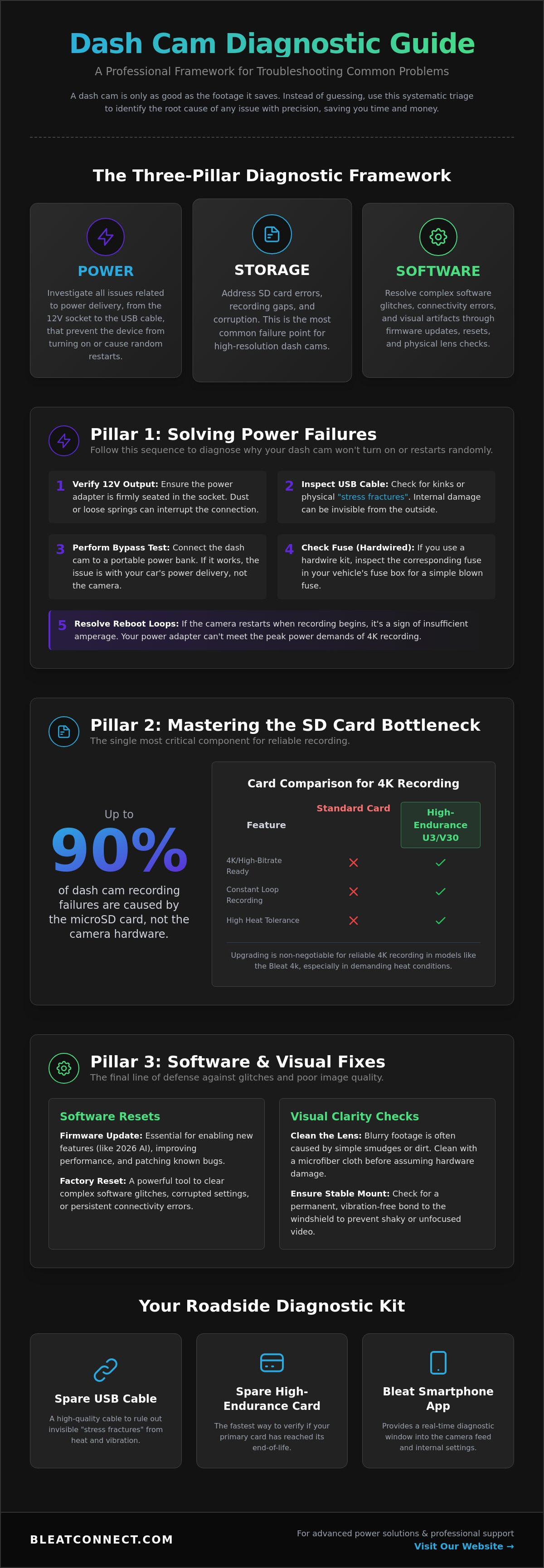
Most drivers react to a failing device with immediate frustration. They assume the hardware is a total loss. Instead of guessing, adopt a professional diagnostic framework. Systematic triage saves hours of downtime. It prevents you from wasting ₹ on unnecessary replacements. We categorize troubleshooting common dash cam problems into three distinct pillars: Power, Storage, and Software. By isolating these variables, you identify the root cause with surgical precision. This is the "Isolation Method." You test each component individually until the failure point reveals itself. It turns a chaotic technical glitch into a manageable fix.
The Power-Storage-Software Triage
The first diagnostic split is simple. Is the unit "Dead" or "Glitching"? A dead unit receives no power. A glitching unit powers on but fails to record. Understanding this distinction is the foundation for understanding dash cam technology and its limitations. Data suggests that 90% of recording failures are actually related to the MicroSD card, not the camera hardware itself. High-resolution sensors in the Bleat 4k car dashcamera demand massive data throughput. When the card fails, the camera appears broken. Always decode the LED indicator patterns before unplugging anything. A steady red light usually confirms power, while a rapid blink often signals a storage write error. These signals are your first line of defense in troubleshooting common dash cam problems.
Essential Tools for Roadside Troubleshooting
Efficiency in the field requires the right kit. Keep a high-quality spare USB cable in your glovebox. Indian road vibrations can cause internal "stress fractures" in cheap cables that are invisible to the eye. A secondary High-Endurance MicroSD card is also vital. It acts as a control variable to verify if your primary card has reached its end-of-life. Finally, utilize the Bleat smartphone app. It provides a real-time diagnostic window into the camera feed and internal settings. This digital connection allows you to verify sensor health without removing the device from the windshield.
Most issues resolve through this systematic approach. DIY fixes work for cable swaps, card formatting, and firmware resets. However, if you notice a physically cracked lens or a bulging internal battery, contact professional support. Knowing when to stop is just as important as knowing how to start. For everything else, this framework ensures your road security remains uninterrupted.
Solving Power Failures: Why Your Dash Cam Won’t Turn On or Restarts
Power delivery is the lifeblood of your vehicle's digital witness. When your device fails to boot or cycles through endless restarts, it's rarely a hardware failure. It's usually a delivery bottleneck. Consistent power is essential for high-performance units like the Bleat 4k car dashcamera, which processes massive amounts of data every second. Use this step-by-step diagnostic sequence to restore your road security.
- Step 1: Verify the 12V output. Ensure your cigarette lighter or hardwire kit is seated firmly. In many Indian vehicles, dust accumulation or loose socket springs can break the circuit during vibrations.
- Step 2: Inspect the USB cable. Look for physical "stress fractures" or sharp kinks. Cabin heat and constant door movement can degrade internal copper strands even if the outer casing looks fine.
- Step 3: Perform a bypass test. Connect your dash cam to a high-quality portable power bank. If the unit stays on, your car's electrical system or the power cable is the culprit.
- Step 4: Check the fuse box. If your unit is hardwired, inspect the specific fuse in your vehicle's panel. A blown fuse is a simple, cheap fix that often mimics a dead camera.
- Step 5: Resolve the reboot loop. If your camera restarts the moment it begins recording, it's likely suffering from insufficient amperage. High-resolution sensors require a peak current that weak adapters cannot provide.
Mastering these steps is the first phase of troubleshooting common dash cam problems before considering a replacement. If you find your current setup lacks the stability required for modern 4K recording, consider exploring advanced power solutions designed for high-draw hardware.
Identifying Insufficient Voltage in 4K Systems
High-end 4K systems demand significantly more stable power than legacy 1080p units. Older car batteries often experience a voltage dip below 11.6V during engine ignition. This sudden sag can cause the dash cam's processor to crash or enter a "Ghost Mode" where the screen is on but no data writes to the card. It's a matter of "powering" versus "charging." A port that charges a smartphone might not provide the sustained 2.1A or 2.5A current needed for a Bleat 3k car dashcamera to operate its AI sensors and GPS modules simultaneously.
Supercapacitors vs. Internal Batteries
Indian summers, where cabin temperatures frequently exceed 45°C, are brutal on internal power cells. Traditional Li-ion batteries often swell or fail, leading to "Last File Corruption" where the camera shuts down before saving the final clip. Modern Bleat hardware utilizes supercapacitors because they handle extreme thermal cycles without degrading. If your camera forgets the date and time every morning, your internal power cell has likely reached its end-of-life cycle. Switching to a supercapacitor-based model ensures your device survives the heat and saves every critical second of footage.
Storage Errors & Recording Gaps: Mastering the SD Card Bottleneck
The "SD Card Error" message is the most frequent notification you'll encounter. It's also the most misunderstood. Unlike a digital camera that records occasionally, a dash cam uses loop recording. This process involves constant, high-speed data overwriting that creates immense thermal and physical stress on the storage controller. When you're troubleshooting common dash cam problems, the storage medium is the first place to look. If your card isn't rated for this specific workload, the system will trigger a failsafe and stop recording to prevent data corruption.
For high-performance hardware like the Bleat 4k car dashcamera, the speed class is critical. A standard U1 (UHS Speed Class 1) card cannot keep up with the massive bitrate required for 4K video. You'll experience dropped frames or "Recording Gaps" that could miss the exact second of an impact. You must use a U3 or V30 card. These are designed to maintain a minimum sequential write speed that matches the camera's output. If your device feels sluggish or refuses to enter recording mode, perform a "Deep Format" using a PC or Mac. Specialized software like the SD Memory Card Formatter tool clears the file system more effectively than the camera's internal menu, often reviving a seemingly dead card.
Selecting the Right Card for 4K Recording
Write endurance is the only metric that matters for long-term road security. Many consumers mistakenly buy "Ultra" or "Standard" cards designed for smartphones. These cards lack the industrial-grade NAND flash required for 24/7 security cycles. You need a "High Endurance" model. These are specifically engineered to handle thousands of overwrite hours without failure. In the Indian climate, where cabin heat accelerates electronic degradation, a high-endurance card is your best defense against total footage loss. The higher the bitrate and resolution of your Bleat 3k car dashcamera, the faster a generic card will fail.
Fixing Corrupted Files and Recording Gaps
Your G-Sensor might be the hidden cause of storage bloat. This sensor detects impacts and "locks" the current video file to prevent it from being overwritten. On bumpy Indian roads, a high sensitivity setting can cause the camera to lock every clip. Eventually, the SD card fills up with protected "Event" files, leaving no room for new footage. This creates a loop where the camera stops recording because it has nowhere to write. Adjust your G-Sensor sensitivity to a medium or low setting. This ensures only genuine incidents are protected while keeping your storage cycle fluid. If you can't view a specific file, use video repair software to rebuild the metadata index, which often recovers footage from a card the dash cam no longer recognizes.
Environmental & Visual Issues: Blurry Footage and Heat Management
Crystal-clear evidence is the primary reason for your investment. When footage looks soft or out of focus, it's often a result of environmental stress rather than a sensor defect. In the context of troubleshooting common dash cam problems, visual clarity is frequently compromised by external factors that users overlook. If your video quality has degraded over time, the solution usually lies in your mounting environment or lens maintenance routine.
While basic guides suggest wiping the lens, they often ignore "Focus Shift." This occurs when extreme cabin temperatures in cities like Delhi or Chennai cause the plastic lens housing to expand slightly. This movement shifts the glass elements out of their factory-calibrated focal plane. Modern Bleat 4k car dashcameras utilize high-quality glass optics to minimize this distortion, but even the best hardware requires a stable environment. If your device frequently falls off the windshield, stop using suction cups. The high-intensity Indian sun weakens suction seals. Use a 3M VHB adhesive mount for a permanent, vibration-free bond that survives 50°C cabin heat.
Night vision graininess is another common complaint. This is usually caused by headlight glare reflecting off a dirty windshield or a dashboard that isn't properly matted. Glare from oncoming traffic can "blind" the sensor, washing out critical details like license plates. Upgrade to a professional-grade Bleat 4k car dashcamera to benefit from advanced Sony STARVIS 2 sensors that manage these high-contrast scenarios automatically.
Maintaining Optical Clarity
Follow the "Microfiber Rule" for all optical surfaces. Never use chemical glass cleaners or paper towels on your dash cam lens. These can strip away anti-glare coatings, leading to permanent hazing. Use a dry, clean microfiber cloth. To eliminate dashboard reflections that ghost onto your footage, install a Circular Polarizer (CPL) filter. This simple hardware addition acts like polarized sunglasses for your camera. It cuts through windshield "veiling glare" and significantly improves color saturation during midday drives.
Heat Management for Parked Vehicles
Dash cams generate significant internal heat while processing 4K video. When parked in direct sunlight, this heat has nowhere to go. Signs of thermal throttling include the camera reducing its frame rate or the screen flickering to protect internal circuits. Position your device behind the rearview mirror to use the car's built-in sunshade. If your unit supports "Parking Mode," it will intelligently manage power consumption and sensor activity to keep temperatures low while you're away. Always ensure there is a small gap between the camera body and the glass to allow for natural airflow.
Firmware Updates & Factory Resets: The Final Line of Defense
Software is the intelligence center of your vehicle's safety system. Even with perfect power delivery and high-endurance storage, your device depends on its firmware to interpret sensor data correctly. Firmware acts as the bridge between hardware and user intent. When physical checks fail, troubleshooting common dash cam problems shifts to the digital layer. Updating this internal code ensures your Bleat 4k car dashcamera utilizes the latest algorithms for collision detection and file management. It's the most effective way to eliminate "ghost" settings that cause random menu freezes or connectivity glitches.
The process for a safe firmware flash is straightforward but requires precision. You can typically update via the Bleat smartphone app or by loading a file onto your MicroSD card. If you choose the card method, ensure your vehicle is running or connected to a stable power source. A loss of power during a software write can "brick" the device, rendering it permanently unresponsive. This is a common pitfall that generic diagnostic guides often overlook. A successful flash refreshes the system architecture and often resolves persistent Wi-Fi pairing issues that plague older software versions.
The Benefits of Regular Firmware Maintenance
Regular updates do more than just fix bugs. They optimize the way your Bleat 3k car dashcamera handles high-contrast lighting on Indian roads. New firmware patches often improve G-sensor accuracy, reducing the number of false-positive "Event" locks caused by speed bumps. They also refine Bluetooth handshakes for faster footage downloads. Keeping your software current is a proactive measure that prevents troubleshooting common dash cam problems from becoming a daily routine. It ensures your hardware evolves alongside new mobile operating systems and connectivity standards.
Performing a Safe Factory Reset
If your unit becomes completely unresponsive, use the "Paperclip Method." Locate the small reset pinhole on the side of the camera body. Press and hold the internal button for five seconds while the unit is powered. This hard reset clears the internal cache and restores factory defaults. It's the ultimate solution for clearing corrupted configuration files that a standard menu reset might miss. After the reboot, you'll need to re-configure your essential settings:
- Time and Date: Sync with GPS or your smartphone to ensure legal admissibility.
- Loop Duration: Set to 3-minute intervals for the best balance of file size and searchability.
- G-Sensor Sensitivity: Adjust to "Low" or "Medium" based on your local road conditions.
If a factory reset and firmware update don't restore functionality, you may be facing a rare internal hardware failure. At this stage, stop DIY attempts and contact Bleat support to discuss your hardware claim. Ensure your journey is always protected; explore the reliable Bleat 4K ecosystem today.
Secure Your Journey with Intelligent Hardware
Mastering the art of troubleshooting common dash cam problems ensures your digital witness remains operational when it matters most. You now have the professional framework to isolate power failures, eliminate storage bottlenecks with high-endurance U3 cards, and manage the intense thermal demands of the Indian climate. By applying systematic triage and keeping your firmware updated, you prevent data gaps and maintain total road security. Reliability isn't just a feature; it's a necessity for every modern traveler.
If your current hardware struggles with the heat or fails to capture critical details during your commute, it's time for an essential upgrade. Upgrade to the Ultra-Reliable Bleat 4K Dashcam to experience the protection of advanced supercapacitor technology and high-endurance hardware. Every unit comes with direct manufacturer support and a comprehensive warranty to give you absolute peace of mind on every drive. Take control of your digital well-being and drive with the confidence that your safety is backed by market-leading innovation. Your journey is protected.
Frequently Asked Questions
Why does my dash cam keep saying "SD Card Error" even after formatting?
Your card likely lacks the high-endurance NAND flash required for constant loop recording. Standard cards fail when the internal controller can no longer manage the high bitrate of 4K video. If a deep format on a PC doesn't work, the card is physically worn out. Replace it with a U3 or V30 rated high-endurance card to ensure your road security never skips a beat.
How can I fix my dash cam if it keeps turning on and off repeatedly?
This "reboot loop" usually stems from a voltage drop or a faulty power cable. High-performance units like the Bleat 4k car dashcamera require a steady 2.1A current to function. If your vehicle's 12V socket is loose or the cable has internal stress fractures, the circuit breaks during vibrations. Test the unit with a portable power bank to isolate the car's electrical system as the cause.
Why is my dash cam footage blurry or out of focus at night?
Nighttime blur is often caused by oil smudges on the lens or "Focus Shift" from extreme cabin heat. Smudges scatter light from oncoming headlights, creating a "starburst" effect that ruins clarity. Clean the optics with a dry microfiber cloth. If the blur persists, the internal lens elements may have shifted due to thermal expansion in high-temperature environments common across India.
Can a dash cam work without being plugged into the car cigarette lighter?
You can power your device using a hardwire kit connected directly to the vehicle's fuse box. This is the preferred method for enabling 24/7 Parking Mode without occupying your cigarette lighter port. Some modern setups also utilize OBD-II power cables for a plug-and-play alternative. These methods provide a cleaner aesthetic and more consistent voltage for advanced AI features and GPS modules.
How do I update the firmware on my Bleat dash cam safely?
Connect your camera to the Bleat smartphone app and follow the on-screen prompts for an over-the-air update. Alternatively, download the firmware file to a formatted MicroSD card and insert it into the camera. Crucially, keep your engine running during the process. A sudden power loss can brick the hardware, making troubleshooting common dash cam problems much more difficult than a simple software patch.
Why does my dash cam stop recording after only a few minutes?
Your G-sensor is likely triggering "Event" locks on every minor road bump. These protected files don't get overwritten, eventually filling the card and stopping the loop recording cycle. Check your storage for a folder named "RO" or "Event." Format the card and lower the G-sensor sensitivity to "Medium" or "Low" to keep the recording flow fluid and uninterrupted.
What should I do if my dash cam gets too hot to touch?
High-resolution 4K processors generate significant heat during operation, which the metal or plastic casing dissipates. It's normal for the device to feel warm, but if it shuts down, it's thermal throttling. Ensure your dash cam isn't blocked by a sunshade and has adequate airflow. Devices with supercapacitors, like Bleat models, are specifically engineered to handle these high operating temperatures safely without battery swelling.
How do I recover deleted or corrupted footage from my dash cam SD card?
Stop using the SD card immediately to prevent new data from overwriting the deleted files. Connect the card to a PC and use specialized data recovery software like Recuva or PhotoRec. If the file is present but won't play, use a video repair tool to rebuild the corrupted metadata index. This is often the final step in troubleshooting common dash cam problems involving critical incident evidence.