

How Much Dash Cam Footage Is Saved? The Ultimate Storage & Duration Guide
Bleat
What if the one piece of evidence that could save your insurance claim was already overwritten by a routine commute to the grocery store? It is a chilling thought for any driver. You invested in a high-performance Bleat 4K car dashcamera to be your silent witness, but you need to know exactly how much dash cam footage is saved before the device starts looping. Most drivers worry about losing critical accident footage or facing sudden SD card errors when they need clarity the most.
We understand that security is not just about having a lens; it is about having the data to back it up. You shouldn't have to guess if your 128GB card holds 24 hours of 1080p video or just 3 hours of 4K footage. This guide provides a definitive breakdown of storage hours versus gigabytes. You will learn how to optimize your settings, lock essential files from deletion, and ensure your journey is always protected by the best in class technology. It is time to gain total confidence in your hardware and your safety on the road.
Key Takeaways
- Master the impact of resolution and bitrate on storage to ensure your camera never stops recording when it matters most.
- Use our duration table to determine exactly how much dash cam footage is saved based on your SD card capacity and resolution settings.
- Secure your evidence by learning how G-sensor technology protects critical files from the automatic loop recording process.
- Select the correct High Endurance U3 hardware to prevent SD card failures during high-bitrate 4K recording sessions.
- Optimize your protection with advanced H.265 compression and proprietary file management for seamless, gap-free video storage.
Key Factors That Determine How Much Footage Is Saved
Security is a data game. To ensure your vehicle is fully protected, you must understand the technical variables that dictate how much dash cam footage is saved on your device. It isn't just about the gigabytes on your card. It is a calculated balance between visual evidence and storage efficiency. Every setting you toggle changes the lifespan of your recorded data before the overwrite cycle begins.
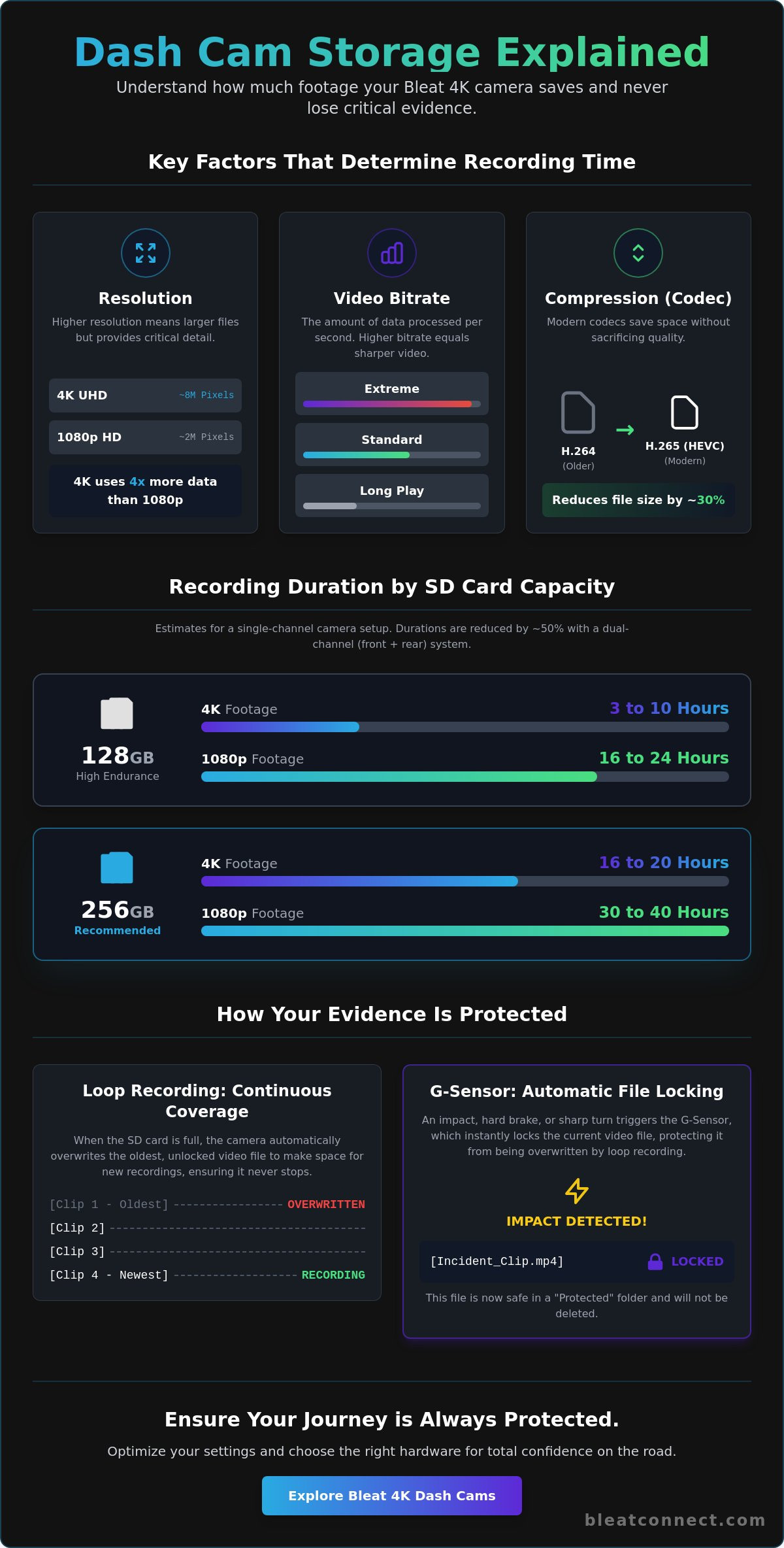
Resolution is the primary driver of storage consumption. A Bleat 4K car dashcamera captures approximately 8 million pixels per frame. This is four times the density of a standard 1080p sensor. While 4K provides the elite clarity needed to identify faces and distant road signs, it also generates significantly larger files. If you double your frame rate from 30fps to 60fps, you provide smoother motion playback, but you also double the data processed every second. Higher resolution and frame rates are essential for premium protection, but they require a strategic approach to storage management.
The Role of Video Bitrate
Bitrate is the amount of data your camera processes per second. It is the bridge between raw sensor data and the final video file. A high bitrate ensures that fast-moving objects, like a car speeding past, remain sharp rather than becoming a pixelated blur. This clarity is critical when you need to read a license plate in a hit-and-run scenario. Many advanced cameras offer different modes:
- Extreme Mode: Maximizes bitrate for the highest possible clarity; fills storage quickly.
- Standard Mode: Balances sharp imagery with moderate file sizes.
- Long Play Mode: Reduces bitrate to extend the recording duration, ideal for long road trips.
Before diving into specific settings, Understanding Loop Recording is vital because it determines how your camera manages these massive files once the card reaches capacity. Without this mechanism, your high-bitrate files would simply stop the camera from recording entirely once the card is full.
H.265 HEVC: The Modern Storage Savior
Modern efficiency relies on advanced compression. High-Efficiency Video Coding (HEVC), also known as H.265, is a breakthrough for 4K dash cams. This technology allows a Bleat 4K car dashcamera to maintain breathtaking detail while reducing file sizes by approximately 30% compared to the older H.264 standard. It achieves this by using more sophisticated algorithms to predict motion between frames.
This means you get more hours of high-definition evidence on the same SD card. We recommend ensuring your smartphone or computer supports HEVC playback to take full advantage of this feature. By utilizing H.265, you aren't just recording; you're optimizing your digital well-being through intelligent engineering.
Dash Cam Recording Duration: Storage Capacity Table
Knowing how much dash cam footage is saved allows you to plan for the unexpected. While resolution defines quality, storage capacity defines your timeline. A 32GB card is no longer the industry standard; it is a bottleneck. For modern 4K systems, you need high-capacity hardware to maintain a functional history of your drives. Every gigabyte counts when you are documenting a long-distance journey or a complex traffic incident.
The following estimates represent real-world recording durations based on standard bitrates. These figures assume a single-channel setup using efficient compression. Note that Key Factors That Determine Footage Saved include not just the card size, but the specific hardware's ability to manage data streams without corruption.
- 128GB Card: Approximately 16 to 24 hours of 1080p video or 3 to 10 hours of 4K video.
- 256GB Card: Approximately 30 to 40 hours of 1080p video or 16 to 20 hours of 4K video.
We recommend maintaining a "Safety Buffer" by choosing a card larger than your absolute minimum requirement. Never aim to fill a card to 100% capacity. Dash cams require a small amount of overhead for file management and system logs. Operating at the edge of your storage limit can lead to minor write delays or file fragmentation. Aim for a card that offers at least double your daily driving duration to ensure you always have a fresh window of evidence.
Single vs. Dual Channel Recording
Adding a rear camera changes the storage equation entirely. Even if the rear sensor records at a lower resolution, it still generates a secondary data stream that must be saved simultaneously. In most dual-channel configurations, your total recording time is reduced by approximately 50%. If you use a Bleat 4K car dashcamera with a rear module, a 128GB card is the absolute minimum for reliable performance. For maximum protection, a 256GB card ensures you don't lose the morning's footage by the time you drive home in the evening.
Estimating Your Daily Driving Needs
Your storage needs depend on your lifestyle. The average commute requires roughly two to four hours of loop history to be safe. However, for the average Indian driver navigating unpredictable urban traffic, the "Sweet Spot" is 12 hours of total storage. This covers the daily commute, parking incidents, and unexpected detours. If you frequently take long-haul trips, prioritize the highest capacity your device supports. You can browse our high-performance camera range to find the perfect balance of resolution and storage for your vehicle.
Understanding Loop Recording and Protected Files
Loop recording is the foundation of modern vehicle surveillance. It ensures your device never stops documenting the road by overwriting the oldest unprotected files with new data. However, this cycle is not truly infinite. The mechanism depends entirely on how much dash cam footage is saved in "unlocked" folders. Once your storage reaches its limit, the camera searches for the oldest clip to replace. If that clip is protected, the system moves to the next, creating a delicate balance between new evidence and saved history.
The G-sensor acts as your digital witness. It detects sudden gravitational shifts, such as hard braking or a collision, and automatically locks the current video segment. You can also trigger this manually using a dedicated emergency button on your Bleat 4K car dashcamera. These protected files are shielded from the loop process. While this guarantees your accident footage is safe, it also removes that capacity from the available loop pool. If your card becomes 80% full of locked files, your "infinite" recording window shrinks to just a few minutes, eventually leading to a total recording halt.
The Hidden Cost of Protected Footage
Locked files are permanent residents on your SD card. Many drivers set their G-sensor sensitivity too high, causing every pothole or speed bump to trigger a false-positive lock. Over weeks of driving, these "ghost events" accumulate and eventually trigger a "Card Full" error. This stops all new recording until you intervene. We recommend a routine monthly format of your media. This clears out unnecessary locks and maintains the health of the file system. When Choosing the Right MicroSD Card, prioritize high-endurance models that can handle these frequent formatting and locking cycles without degradation.
Parking Mode and Event Storage
Advanced parking modes offer a smarter way to manage storage while your vehicle is stationary. Time-lapse recording is the most efficient method; it captures one frame per second, allowing you to review hours of footage in minutes. Alternatively, motion detection and impact detection only save files when a specific trigger occurs. A Bleat 4K car dashcamera utilizes intelligent partitioning to keep these parking events separate from your driving loop. This ensures that a busy street doesn't overwrite a critical parking lot hit-and-run. Proper event management is the difference between a secure vehicle and a missed opportunity for evidence.
Choosing the Right MicroSD Card for Dash Cam Use
Your memory card is the most critical component of your security ecosystem. It doesn't matter how high your resolution is if the storage medium fails during a write cycle. Choosing the right card directly impacts how much dash cam footage is saved reliably over time. For a Bleat 4K car dashcamera, you cannot use a standard card designed for a smartphone or a digital camera. These devices require constant, high-bitrate data streams that would burn through a standard consumer card in a matter of months. A high-performance camera needs high-performance storage.
High-endurance cards are built for the relentless cycle of loop recording. Standard SD cards have a limited write cycle, meaning they can only be overwritten a few hundred times before the flash memory cells degrade and stop accepting data. In contrast, a high-endurance card is engineered to handle thousands of hours of continuous recording. When temperatures inside a parked car in the Indian summer hit 60°C or higher, standard cards often warp or experience data corruption. High-endurance hardware is tested to survive these thermal extremes, ensuring your evidence remains intact when the environment is at its harshest.
High Endurance vs. Standard SD Cards
The difference lies in the NAND flash quality. Standard cards typically use TLC (Triple Level Cell) memory, which is cost-effective but has a short lifespan under heavy use. High-endurance cards utilize MLC (Multi Level Cell) or specialized high-grade flash that offers superior longevity and reliability. Most major manufacturers explicitly void their warranties if a standard card is used in a dash cam. Look for cards with a minimum rating of 5,000 to 10,000 hours of recording. For 4K video, a U3 or V30 speed class is mandatory. These ratings guarantee a minimum sustained write speed of 30MB/s, preventing the stutter or file gaps common with slower cards.
Maintenance Tips for Data Integrity
Even the best hardware requires oversight. Follow the "Format Every Month" rule to clear out file system errors and refresh the card structure. Watch for warning signs like missing video clips, slow access speeds when viewing files on your phone, or the camera rebooting unexpectedly. These are indicators that your storage is reaching its end of life. Most professional-grade SD cards should be replaced every 18 to 24 months, regardless of their perceived health. It is a small price to pay for absolute certainty. Don't risk your data on inferior storage. Upgrade to a Bleat 4K car dashcamera and pair it with high-endurance hardware for ultimate peace of mind.
The Bleat 4K Advantage: Optimized Security and Storage
Bleat stands as India’s No. 1 dashcam brand because we don't just record; we optimize every byte of data. Our Bleat 4K car dashcamera utilizes advanced H.265 HEVC compression to redefine storage efficiency. This technology allows for superior data density, providing approximately 30% more recording time on the same SD card compared to older H.264 devices. It effectively answers the question of how much dash cam footage is saved with a definitive advantage. You get more hours of elite clarity without sacrificing the forensic detail needed for insurance claims.
Reliability is our core identity. Our proprietary file management system ensures zero-second gaps between video clips. Most standard cameras lose critical seconds during the transition between files as the processor resets for the next segment. Bleat eliminates this vulnerability. Every millisecond of your journey is documented with precision. Our hardware is specifically engineered for the high-performance demands of constant data writing, ensuring your silent witness never blinks.
Smart File Management in Bleat Devices
Our auto-overwriting logic is intelligent and assertive. It prioritizes the safety of your most important data while maintaining a fresh loop of recent driving. The Bleat 4K and 3K models offer full support for high-capacity 256GB cards. This is a vital feature for long-distance travel across the subcontinent, where you might need 20 hours of continuous 4K history. Through the Bleat mobile app, you can instantly download "Event" clips directly to your smartphone. You can move critical evidence to your phone's local storage before the loop cycle ever reaches them. This creates a secondary, secure layer of protection for your digital well-being. The calculation of how much dash cam footage is saved remains consistent and reliable, even when the card is nearing its capacity.
Your Road Companion for Safety
Driving in modern traffic requires total focus. Your security hardware should work flawlessly without manual intervention. Bleat provides the authoritative confidence that comes from reliable, high-resolution storage. You'll never miss a detail. From license plates in low-light conditions to distant road signs, the visual clarity is absolute. Our devices are built to survive the extreme thermal conditions of the Indian climate, preventing processor throttling during high-bitrate sessions. Our products are essential upgrades for a safer, more connected lifestyle. They are forward-thinking companions for the modern traveler who values both innovation and security. It is time to secure your journey with a brand that leads the market through technological excellence.
Upgrade your vehicle with Bleat 4K security.
Secure Your Digital Witness on the Road
Maximizing your vehicle's protection requires more than just a lens. It demands an intelligent strategy for data management. You now understand how resolution, bitrate, and high-endurance hardware dictate exactly how much dash cam footage is saved on your device. By balancing elite 4K clarity with efficient H.265 compression, you ensure that every critical frame is captured and preserved without prematurely filling your card. You don't have to worry about the overwrite cycle stealing your evidence when you utilize the right hardware and settings.
Elevate your driving experience with technology designed for the modern traveler. Our systems combine 4K Ultra HD Resolution with advanced G-Sensor Event Protection to keep your most vital files locked and safe. It's time to stop guessing about your storage limits and start driving with absolute confidence. Your journey deserves a protector that never blinks and a storage system that never fails.
Secure your journey with the Bleat 4K Dashcam. Experience the peace of mind that comes from owning India's leading dash cam technology today.
Frequently Asked Questions
How many hours does a 64GB SD card hold on a 4K dash cam?
A 64GB card typically holds 1.5 to 2.5 hours of 4K footage. This duration varies based on your camera's bitrate and compression efficiency. Higher resolutions capture more data per second, which fills smaller cards rapidly. For a Bleat 4K car dashcamera, we recommend moving to a 128GB or 256GB card to maintain a more useful history of your drives.
Does a dash cam stop recording when the SD card is full?
No, your dash cam won't stop recording when the storage is full. It uses a mechanism called loop recording to overwrite the oldest unprotected files with new data automatically. This ensures continuous protection without manual intervention. However, if your card is clogged with protected or locked files, the camera may stop recording and display a "Card Full" error message.
Can I use a regular phone SD card in my dash cam?
You shouldn't use a standard phone SD card in your dash cam. These cards aren't designed for the constant, high-speed writing cycles required by vehicle security systems. They often fail within months due to thermal stress or write-cycle exhaustion. Always choose a High Endurance card with a U3 or V30 speed rating to ensure your hardware operates reliably in all conditions.
How do I stop my dash cam from overwriting important footage?
To prevent overwriting, use the G-sensor auto-lock feature or the manual emergency button. These actions move the current clip to a protected folder that the loop recording process cannot touch. It's the most effective way to manage how much dash cam footage is saved for long-term evidence. Just remember to download these files to your phone via the Bleat app to keep your card clear.
Why is my dash cam saying "Memory Error" even though the card is new?
A memory error on a new card usually indicates a speed class mismatch or a formatting issue. Dash cams recording in 4K require a minimum sustained write speed, often designated as U3 or V30. If your card is too slow, the camera can't save data fast enough. Always format a new card inside the camera settings menu before your first drive to ensure the file system is properly aligned.
How often should I format my dash cam SD card?
We recommend formatting your SD card once every month. This routine maintenance clears out file system fragments and removes unnecessary locked files that accumulate from speed bumps or hard braking. Regular formatting extends the lifespan of your storage media and prevents unexpected recording failures. It's a simple step that ensures your digital witness is always ready for the next incident.
Does recording in the cabin (Interior Cam) use more storage?
Yes, recording with an interior cabin camera increases storage consumption significantly. Adding a second or third channel creates additional video streams that must be saved simultaneously. This typically reduces your total recording time by 30% to 50% depending on the resolution of the interior sensor. If you use a multi-channel setup, prioritizing a 256GB high-endurance card is essential for maintaining a sufficient loop history.
What happens to the footage if the dash cam loses power during an accident?
If your dash cam loses power, a built-in supercapacitor or internal battery provides enough energy to save the final video file safely. This last file protection is critical during severe impacts where the power cable might be severed or disconnected. Bleat devices are engineered with these high-grade components to ensure your most important evidence isn't lost at the moment of impact. Your data remains secure on the card.