

Capturing Every Mile: The Ultimate Guide to Dash Cam Time-Lapse Feature for Travel
Bleat
What if your long-distance drive, perhaps spanning many hours, could be condensed into a stunning 60-second cinematic masterpiece without you ever touching an editing app? Many road trippers struggle with SD cards that fill up before their journey even ends, forcing them to choose between security and scenery. You shouldn't have to worry about your camera looping over a breathtaking mountain pass because the card is clogged with hours of highway asphalt. The dash cam time-lapse feature for travel solves this by compressing massive amounts of data into sleek, high-speed highlights.
We'll show you how to transform your long-distance drives into professional-grade travel summaries while maximizing every megabyte of your storage. You'll discover the technical secrets behind frame rate optimization and why 4K resolution is essential for these high-speed captures. This guide breaks down how to use the dash cam time-lapse feature for travel to ensure reliable documentation of your entire trip, from the first kilometer to the last. It's time to upgrade your road trip experience with the intelligence of a Bleat 4k car dashcamera.
Key Takeaways
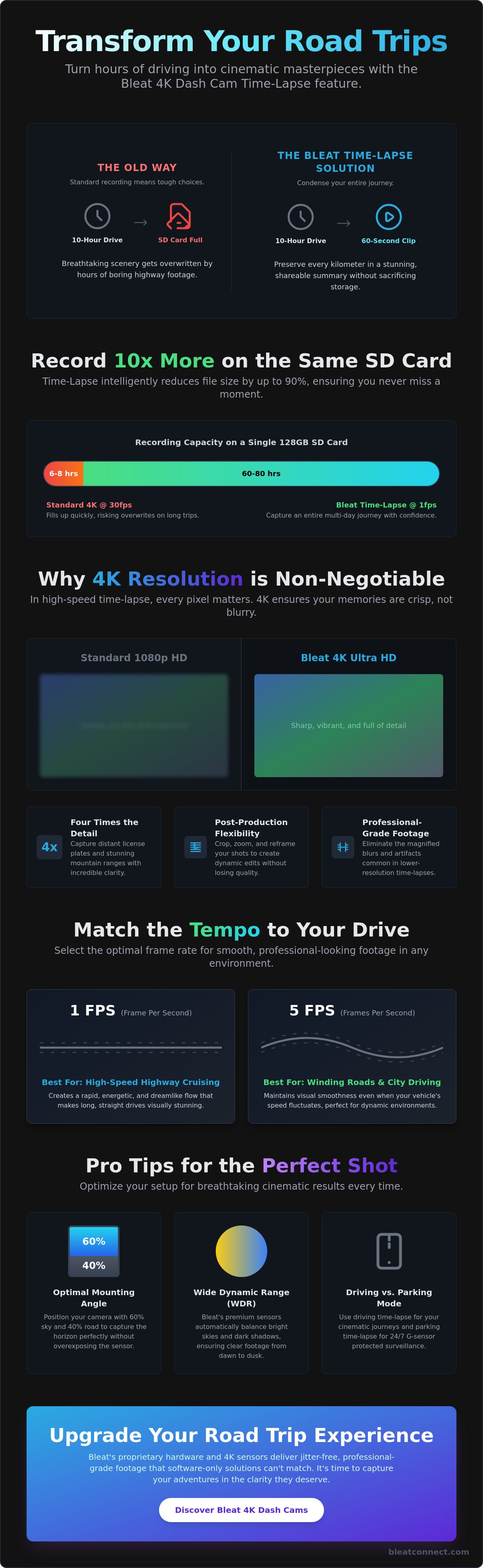
- Master the dash cam time-lapse feature for travel to condense 10-hour drives into bite-sized cinematic clips while saving up to 90% of your SD card storage.
- Learn why Bleat 4K resolution is non-negotiable for capturing crisp details like distant mountain ranges and license plates in high-speed travel summaries.
- Differentiate between driving and parking time-lapse modes to maintain active G-sensor protection and 24/7 surveillance with minimal power drain.
- Discover the optimal mounting angle, 60% sky and 40% road, to ensure your travel footage captures the horizon perfectly without overexposing the sensor.
- Understand the proprietary hardware integration in Bleat cameras that delivers jitter-free, professional-grade footage compared to standard software-only solutions.
What is the Dash Cam Time-Lapse Feature for Travel?
A dash cam time-lapse feature for travel isn't just a standard recording mode. It's a fundamental shift in how your hardware processes reality. Standard video recording captures 30 distinct frames every single second. Time-lapse captures just one or two. This technique, rooted in the principles of time-lapse photography, allows your Bleat 4k car dashcamera to condense hours of highway driving into a few minutes of high-speed, cinematic footage. It transforms a functional security device into a creative powerhouse for the modern traveler.
Standard loop recording is built for incident protection. It saves 3 or 5-minute clips and overwrites the oldest files as soon as the SD card hits capacity. In high-traffic Indian cities like Delhi or Bangalore, a standard 4K recording might fill your card in just a few hours. The dash cam time-lapse feature for travel operates with a different logic. It bypasses the aggressive overwrite cycle by reducing the data footprint from the moment you start the engine. You get the security of a dashcam with the creative output of a professional vlogging camera. Travelers are increasingly shifting to this mode on scenic routes like the Mumbai-Goa highway because it ensures no part of the journey is lost to the loop.
The Science of Frame Intervals
Frame intervals dictate the tempo and visual energy of your travel story. Most high-end hardware offers 1fps, 2fps, or 5fps settings. A 1fps (one frame per second) setting is the gold standard for high-speed highway cruising. It creates a rapid, energetic flow that makes long-haul drives feel like a dreamlike montage. If you're navigating a winding mountain pass or a dense city center, 5fps is the better choice. This higher frequency maintains visual smoothness even when your vehicle speed fluctuates. Matching your interval to the landscape ensures your footage remains watchable and professional.
Storage Efficiency vs. Video Length
Storage management is where the technical math truly shines. On a standard 128GB high-endurance card, raw 4K footage at 30fps might only last 6 to 8 hours before the camera begins overwriting old files. In time-lapse mode, that same card can document 60 to 80 hours of continuous driving. This prevents the frustrating "overwrite" of your morning mountain views by your evening hotel arrival. Time-lapse is a tool that reduces file size by 10x while maintaining visual narrative. You don't just record more; you record smarter, ensuring every kilometer of your Indian road trip is preserved in stunning 4K clarity.
The Technical Edge: Why 4K Resolution Matters for Time-Lapse
Resolution is the foundation of any high-quality travel production. While budget cameras often settle for 1080p, the dash cam time-lapse feature for travel requires the massive pixel count of 4K to truly shine. When you speed up footage, every minor blur or digital artifact becomes magnified. Bleat 4K hardware provides four times the detail of standard HD, ensuring that your journey across the diverse landscapes of India, from the lush Western Ghats to the golden sands of Jaisalmer, remains sharp and professional. High resolution isn't just a luxury; it's a technical requirement for anyone wanting to create cinematic memories rather than pixelated blurs.
The real magic happens in post-production. The Benefits of Shooting in 4K include the ability to crop and reframe your shots without sacrificing quality. If you capture a stunning sunrise over the Ganges but want to focus on a specific architectural detail in the background, 4K gives you that flexibility. You can digitally zoom into your footage to create artificial pan-and-tilt movements, adding a dynamic "vlogging" feel to your static dashcam clips. This level of creative control is only possible when you start with a high-density sensor that preserves every fine line and color gradient. For those ready to upgrade their road trip documentation, the Bleat 4K car dashcamera delivers this professional-grade canvas as a standard feature.
Sensor Quality and Light Sensitivity
A 12-hour drive in India involves radical shifts in lighting. You might start in the pre-dawn mist of the Himalayas and end in the harsh, direct noon sun of the plains. Premium sensors used in Bleat hardware utilize Wide Dynamic Range (WDR) to balance these extremes. WDR prevents the sky from blowing out into a white void while ensuring the road ahead remains visible in the shadows. This is critical for "night-to-day" time-lapse transitions, where the camera must rapidly adapt its exposure settings frame-by-frame to maintain a consistent visual narrative throughout the entire journey.
Bitrate and Compression Standards
High resolution requires intelligent data management. Bleat utilizes H.265 (HEVC) compression to ensure that your 4K files remain manageable without losing the crispness of road signs or distant landmarks. We optimize the bitrate specifically for the dash cam time-lapse feature for travel, prioritizing the details that matter most to explorers. 4K time-lapse allows for 200% zoom without losing 1080p clarity. This means you can focus on the action while keeping your file sizes lean enough for quick sharing via mobile apps.
Driving vs. Parking: Choosing the Right Time-Lapse Mode
A common mistake among new users is treating all time-lapse settings as identical. The dash cam time-lapse feature for travel actually operates through two distinct profiles: Driving Mode and Parking Mode. Each serves a specific purpose, and understanding the difference is vital for both your car's battery health and the quality of your travel archives. While driving mode captures the kinetic energy of your journey, parking mode acts as a silent, efficient sentry while you rest. Transitioning between these modes is seamless with a Bleat hardwire kit, which provides the constant power required for stationary surveillance while intelligently monitoring your vehicle's battery voltage.
Bleat hardware prioritizes safety above all else. Even when you're recording in a compressed time-lapse format, the internal G-sensor remains fully active. If the camera detects a sudden impact or jarring movement, it instantly overrides the time-lapse setting. The system switches to standard, high-bitrate emergency recording to ensure every second of a critical incident is captured in full detail. This proprietary hardware integration means you never have to sacrifice security for the sake of a cinematic travel montage.
Documenting the Journey (Driving Mode)
When you're cruising on Indian highways at 80-100 km/h, the 1fps or 2fps setting is your best ally. This creates a smooth, high-energy flow that makes even the longest stretches of the NH44 look like a professional film. During long summer drives in regions like Rajasthan or Tamil Nadu, heat management is a priority. Bleat 4k car dashcameras are engineered with high-temperature resistance to prevent thermal throttling during extended time-lapse sessions. If you spot something spectacular, you can still trigger a manual "event" save. This locks a full-speed video clip without interrupting your primary time-lapse stream.
Stationary Surveillance (Parking Mode)
Parking mode transforms your dashcam into a long-term monitor for hotel parking lots or remote campsites. The dash cam time-lapse feature for travel allows you to review a full 12-hour overnight stint in a concise 2-minute clip. This is far more efficient than traditional motion detection, which can be triggered by every passing stray animal or swaying tree branch. To prevent car battery drain, our systems include built-in voltage cut-offs. Once your battery hits a pre-set threshold (typically 11.8V or 12V), the camera shuts down safely, ensuring your car always starts the next morning.
Step-by-Step: Setting Up Your Dash Cam for Travel Videos
Setting up the dash cam time-lapse feature for travel requires precision. It isn't a "set and forget" process if you want professional results. Start with your storage. In the intense heat of Indian summers, where cabin temperatures can soar, a standard SD card is a liability. You must use a Class 10, U3 high-endurance card designed for constant write cycles. Once the hardware is ready, focus on your composition. Most drivers point their camera too low. For cinematic travel videos, adjust your lens to capture 60% sky and 40% road. This balance ensures the camera's light sensor doesn't overcompensate for dark asphalt, keeping your horizons vibrant and clear.
Accessing the feature is straightforward. Navigate the Bleat menu to find "Time-Lapse Record" and toggle it on. Choosing the right interval is your next critical decision. Use a 1-second interval for highway cruising at 80 km/h to maintain a sense of speed. If you're documenting a slow sunset at a campsite or a crawling city commute, switch to a 5-second interval. Before you pull out of the driveway, sync the camera with the Bleat mobile app. Check the live view to verify your angle and ensure your GPS has a solid lock to embed location data into your travel log.
Hardware Essentials for National Travel
Driving across India presents unique challenges. A Circular Polarizer (CPL) filter is mandatory to eliminate dashboard reflections that can ruin a high-resolution time-lapse. Without it, the bright Indian sun will bounce off your dash and create a permanent ghost image on your footage. Additionally, a professional hardwire kit is required to unlock 24/7 features without draining your battery. This setup allows the dash cam time-lapse feature for travel to function seamlessly during overnight stops in remote locations like Spiti or Munnar.
Optimizing for Social Media Sharing
Sharing your journey shouldn't involve cables or laptops. Use the built-in 5GHz Wi-Fi to download time-lapse clips directly to your smartphone via the Bleat App. The app includes intuitive tools for quick trimming and color enhancement. You don't need to be a professional editor to produce high-quality content. Ready to start your next adventure? Explore the Bleat 4K car dashcamera range to find your perfect travel companion today.
Why Bleat 4K Dashcams are the Ultimate Travel Companion
Bleat is the undisputed market leader in high-performance vehicle surveillance within the region. Our dominance is built on a single promise: elite technology that remains accessible to every Indian explorer. The dash cam time-lapse feature for travel in our 4K lineup isn't a tacked-on software gimmick. It relies on proprietary hardware integration that ensures your footage remains stable and jitter-free, even on the most challenging rural roads. While competitors struggle with stuttering frames, Bleat delivers fluid, cinematic memories that look professional right out of the camera.
Security is our core philosophy. We are the tech-savvy protector for your digital well-being. Unlike generic models that disable security during specialized recording, Bleat ensures that G-sensor impact detection and loop recording work in perfect harmony with time-lapse mode. If an incident occurs during your cross-country journey, our hardware prioritizes that data immediately. You get the peace of mind that comes with national support and a product designed specifically for the rigors of the Indian environment.
Bleat 4K vs. Traditional Dashboard Cameras
Traditional cameras often lack the processing power required to encode high-resolution frames at rapid intervals. This leads to overheating and dropped frames. Bleat 4K units utilize dedicated chipsets optimized for high-speed encoding, maintaining peak performance during 10-hour highway stints. Our user-friendly interface is designed for the fast-paced traveler. You can adjust your interval settings or download clips during a quick chai break without fumbling through complex menus. It's a refined experience built for those who value efficiency and immediate results.
Join the Bleat Community of Travelers
We invite you to be part of an elite group of Indian road-trippers. Share your most stunning time-lapse summaries with us on social media for a chance to be featured on our official channels. We continuously enhance our products through over-the-air firmware updates that refine our time-lapse algorithms based on real-world user feedback. Your investment grows smarter over time, ensuring your camera remains at the cutting edge of travel technology. Explore the Bleat 4K Dashcam for your next journey and transform how you document the open road.
Elevate Your Travel Narrative Today
Your next Indian road trip deserves more than just a basic security record. By mastering the dash cam time-lapse feature for travel, you've unlocked the ability to compress days of exploration into minutes of high-impact visual storytelling. You now understand how to optimize storage without losing a single scenic mile. You also know why 4K resolution is the non-negotiable standard for professional-grade results that stand the test of time. It's the difference between a blurry memory and a cinematic masterpiece.
Bleat provides the hardware foundation for this digital transformation. Trusted by thousands of travelers across India, our systems offer 4K Ultra-HD resolution for cinematic clarity alongside advanced time-lapse and parking mode features for total security. Don't let your most precious travel memories be looped over by standard recording cycles. Upgrade to the Bleat 4K Dashcam and Start Documenting Your Journey today. Secure your vehicle and your story with the region's leader in intelligent dashcam technology. Your journey is waiting to be captured in stunning detail.
Frequently Asked Questions
Does time-lapse mode record audio on a dash cam?
Time-lapse mode does not record audio on a dash cam. Since the camera captures individual frames at set intervals rather than a continuous stream, a synchronized audio track is technically impossible. This results in a silent, cinematic file that's ideal for adding your own travel music during editing. It also helps keep the file size significantly smaller than standard 4K video files with audio tracks.
Will using the time-lapse feature for travel drain my car battery?
Using the dash cam time-lapse feature for travel won't drain your car battery if you use a Bleat hardwire kit. Our kits include an intelligent voltage monitoring system that automatically cuts power if the battery drops below 11.8V. In fact, time-lapse mode consumes less energy than standard recording because the image processor isn't working at a full 30fps capacity. It's a highly efficient way to monitor your vehicle.
What is the best frame interval for a highway road trip time-lapse?
A 1fps (one frame per second) interval is the optimal setting for highway road trips. This speed creates a smooth, high-energy flow that condenses a 60-minute drive into just two minutes of footage. If you're driving through exceptionally scenic mountain passes at lower speeds, switching to 2fps or 5fps can help preserve more environmental detail without making the final video feel too frantic or jumpy.
Can I still see license plates in a time-lapse video?
Identifying license plates is more challenging in time-lapse mode compared to standard 30fps video. Because the camera only captures one frame every second, a fast-moving vehicle might only appear in a single frame. However, the 4K Ultra-HD resolution in Bleat cameras provides enough pixel density to capture plate details if the relative speed between vehicles is low or during stops at toll plazas and traffic lights.
Do I need a special SD card for time-lapse recording?
You absolutely need a high-endurance SD card for reliable time-lapse recording. We recommend a Class 10, U3 rated card that's specifically built for the constant write cycles of a dashcam. Standard cards often fail under the thermal stress of the Indian climate. A high-endurance card ensures that your 10-hour travel logs are saved securely without corruption or data loss during the high-speed encoding process.
Does the G-sensor work while the dash cam is in time-lapse mode?
The G-sensor remains fully operational while the dash cam is in time-lapse mode. Bleat's proprietary hardware integration ensures that any sudden impact or jarring movement triggers an immediate switch to emergency recording. The camera will lock a standard, high-bitrate video file to a protected folder. This ensures you have a detailed record of the incident while the rest of your journey remains in the compressed time-lapse format.
How much storage space does a 1-hour time-lapse video take?
A 1-hour time-lapse video recorded at 1fps takes up approximately 90% less space than a standard 4K video. While a typical 1-hour 4K 30fps file might consume 15GB to 20GB, a time-lapse version usually stays under 1GB. This efficiency is why the dash cam time-lapse feature for travel is the ultimate hack for long-haul drives across India, allowing you to document entire weeks of travel on a single card.
Can I convert a regular dash cam video into a time-lapse later?
You can convert regular dash cam video into a time-lapse using third-party editing software, but you lose the primary benefits of the in-camera feature. Converting later doesn't save any SD card space during your trip, nor does it reduce the power consumption of the device. Using the native time-lapse mode on your Bleat camera is the only way to maximize storage efficiency and ensure your card doesn't loop over morning footage.